Final report

Current flow
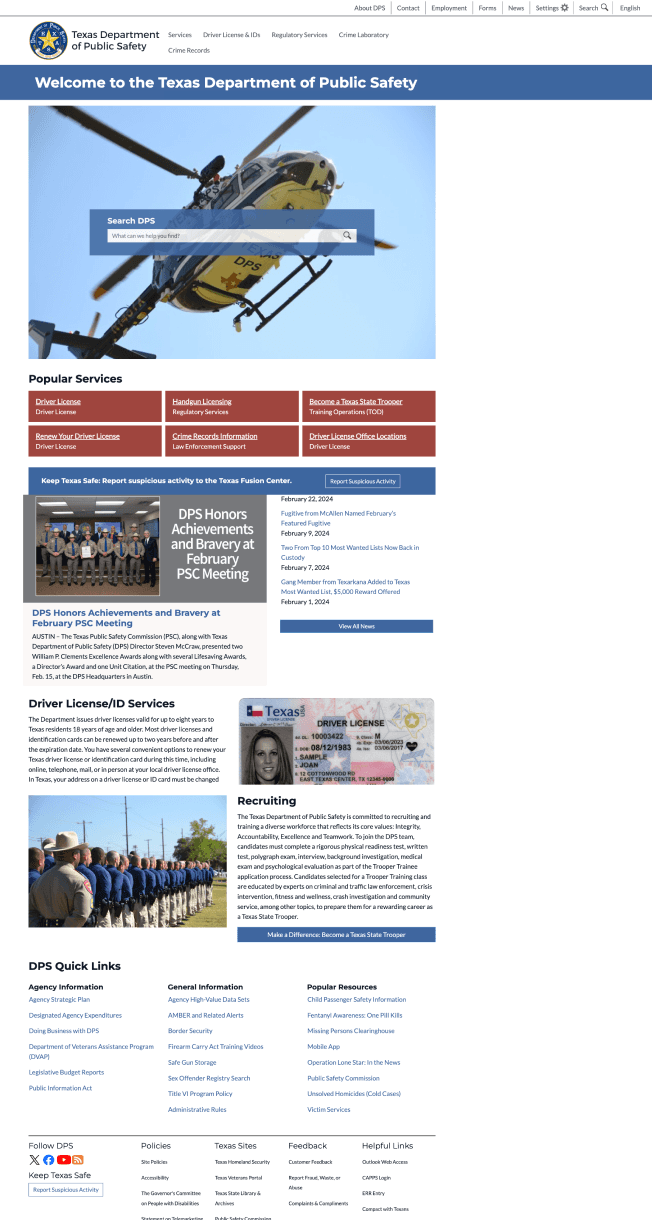
Home page
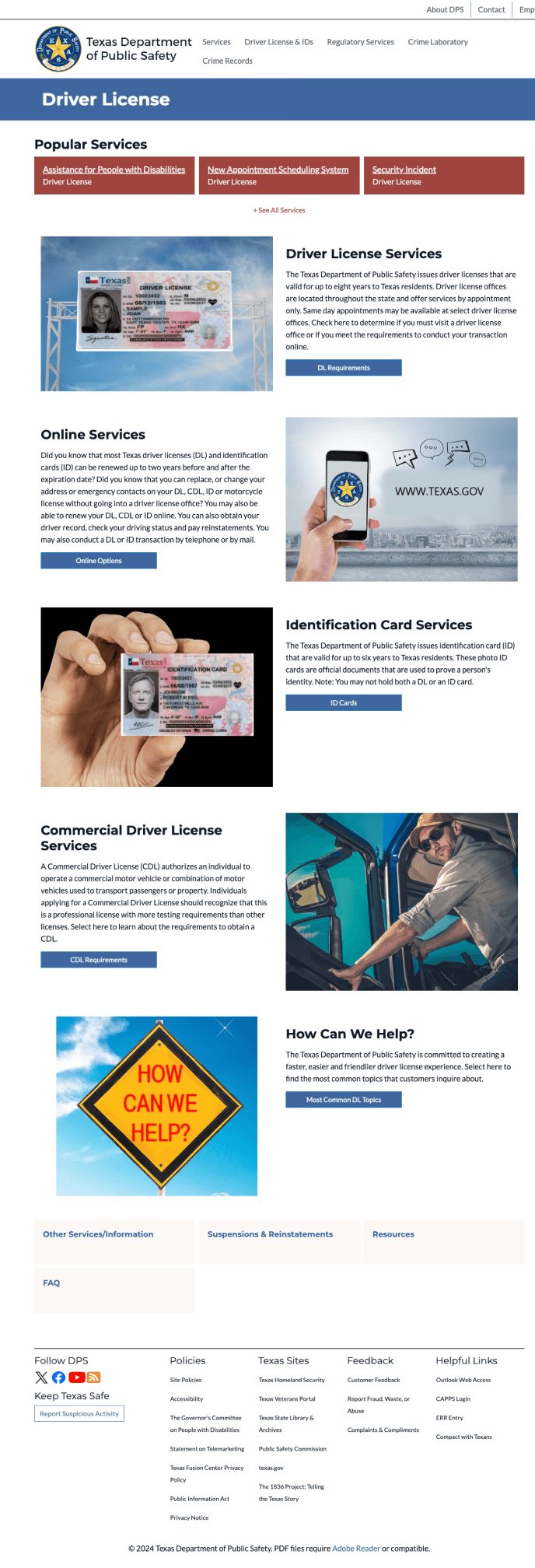
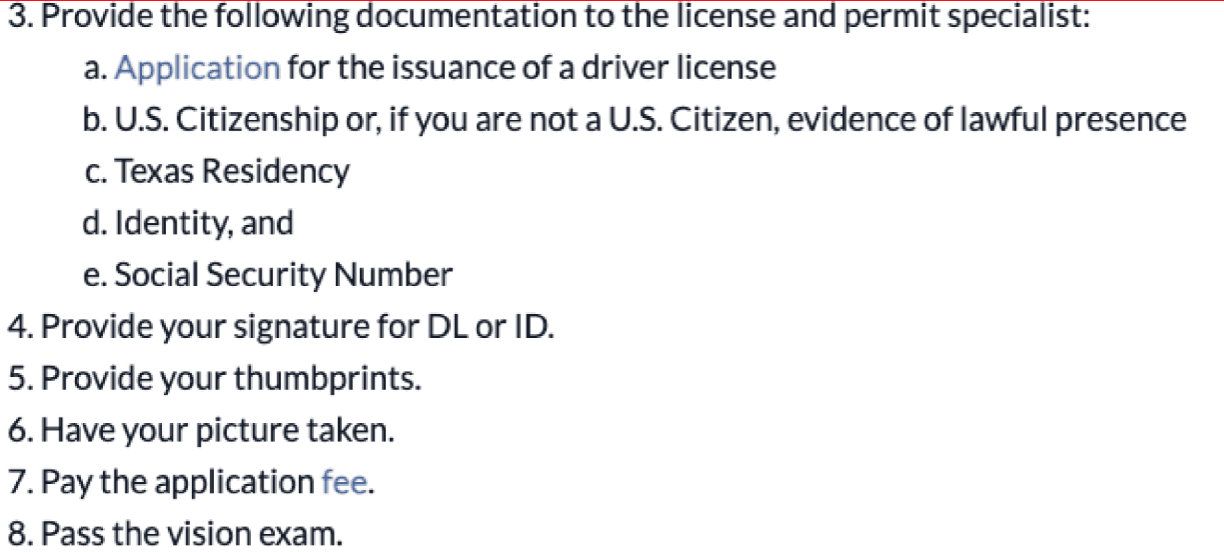
Driver license page

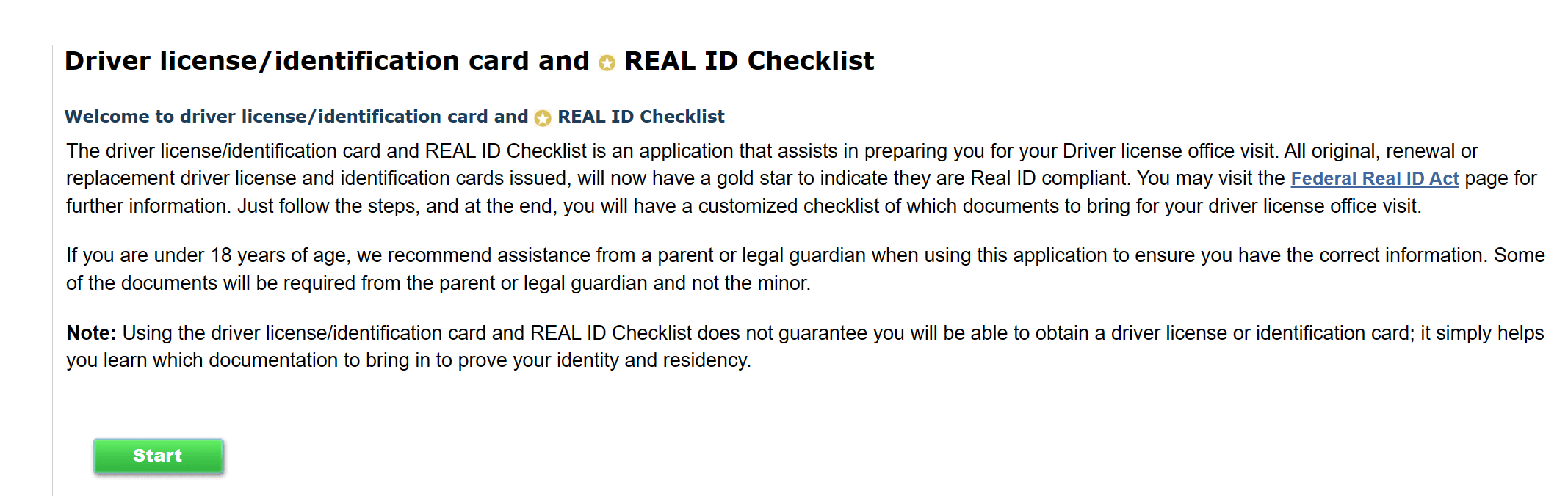
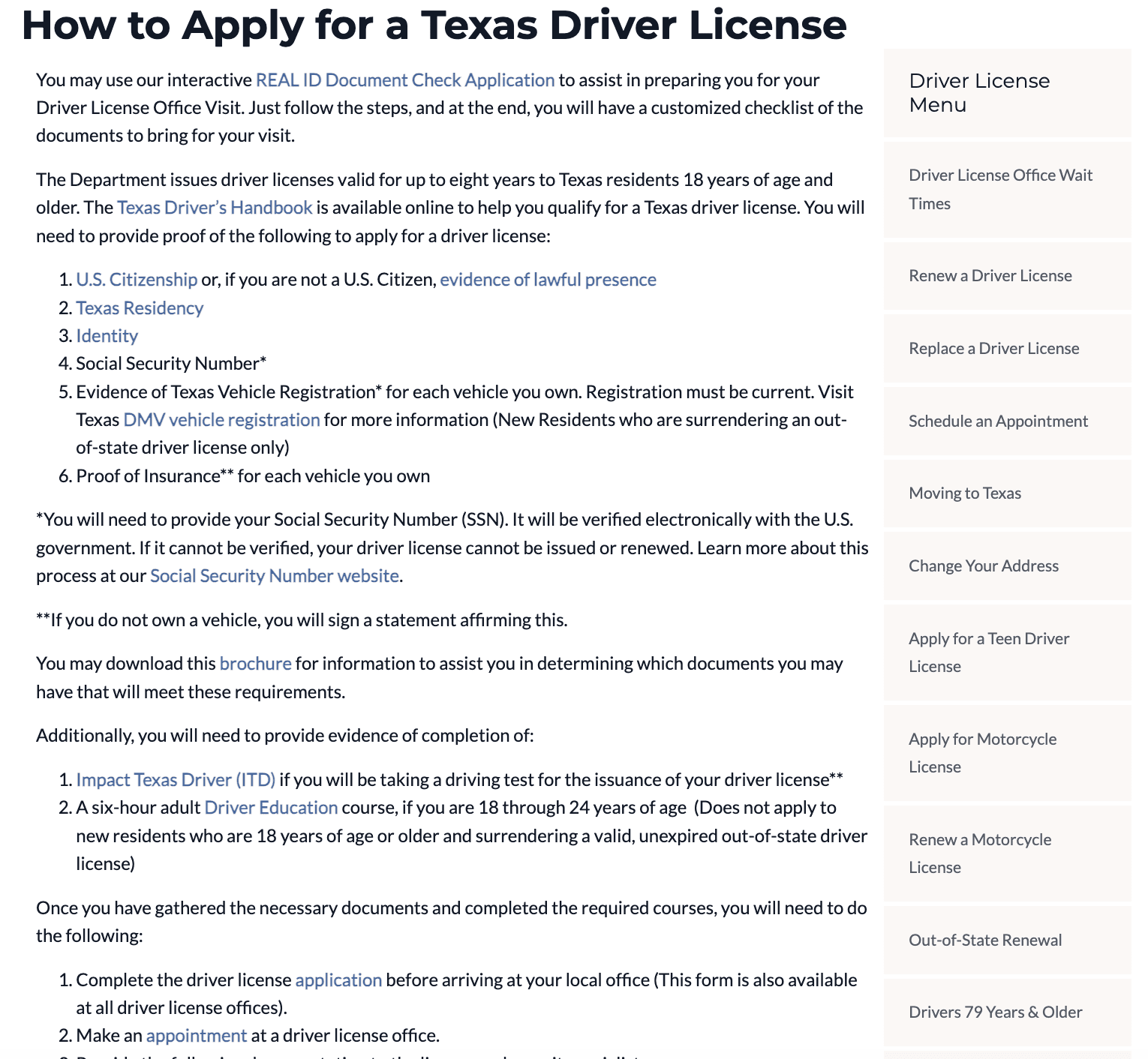
How to apply page
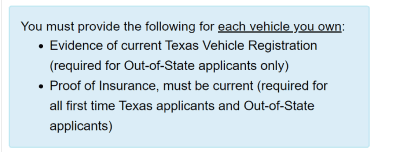
proof a of identity
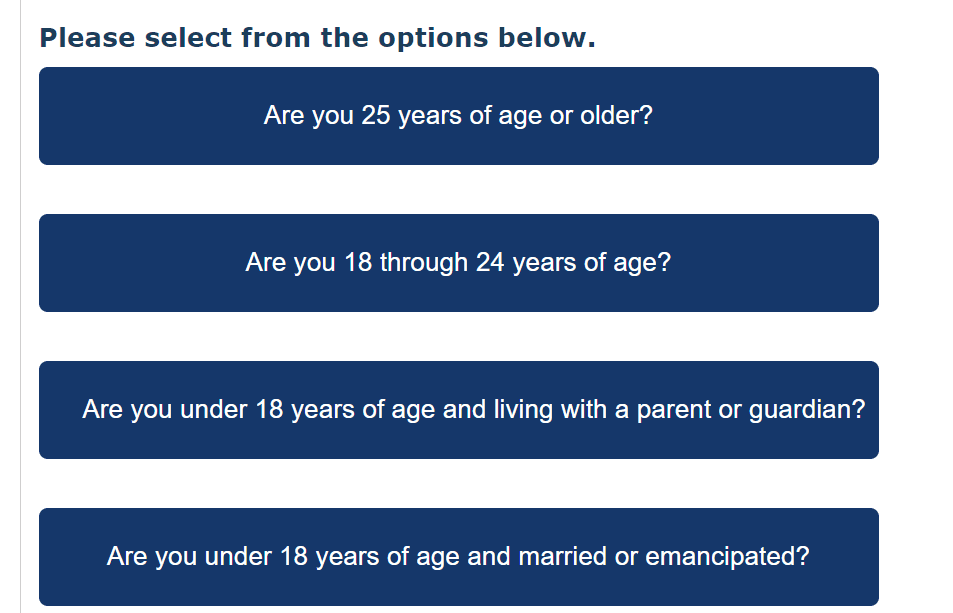
age
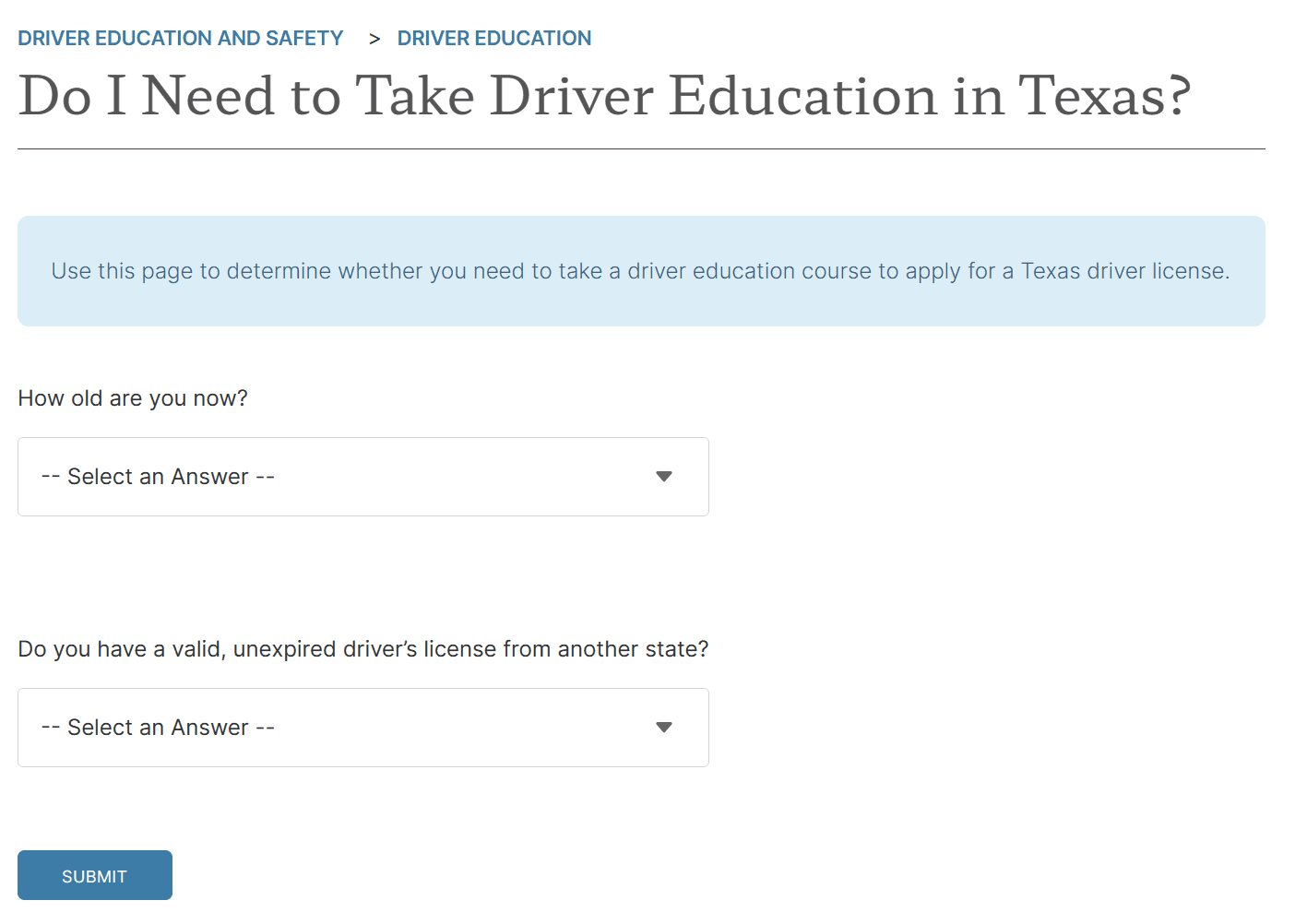
course education
own a vehicle or not





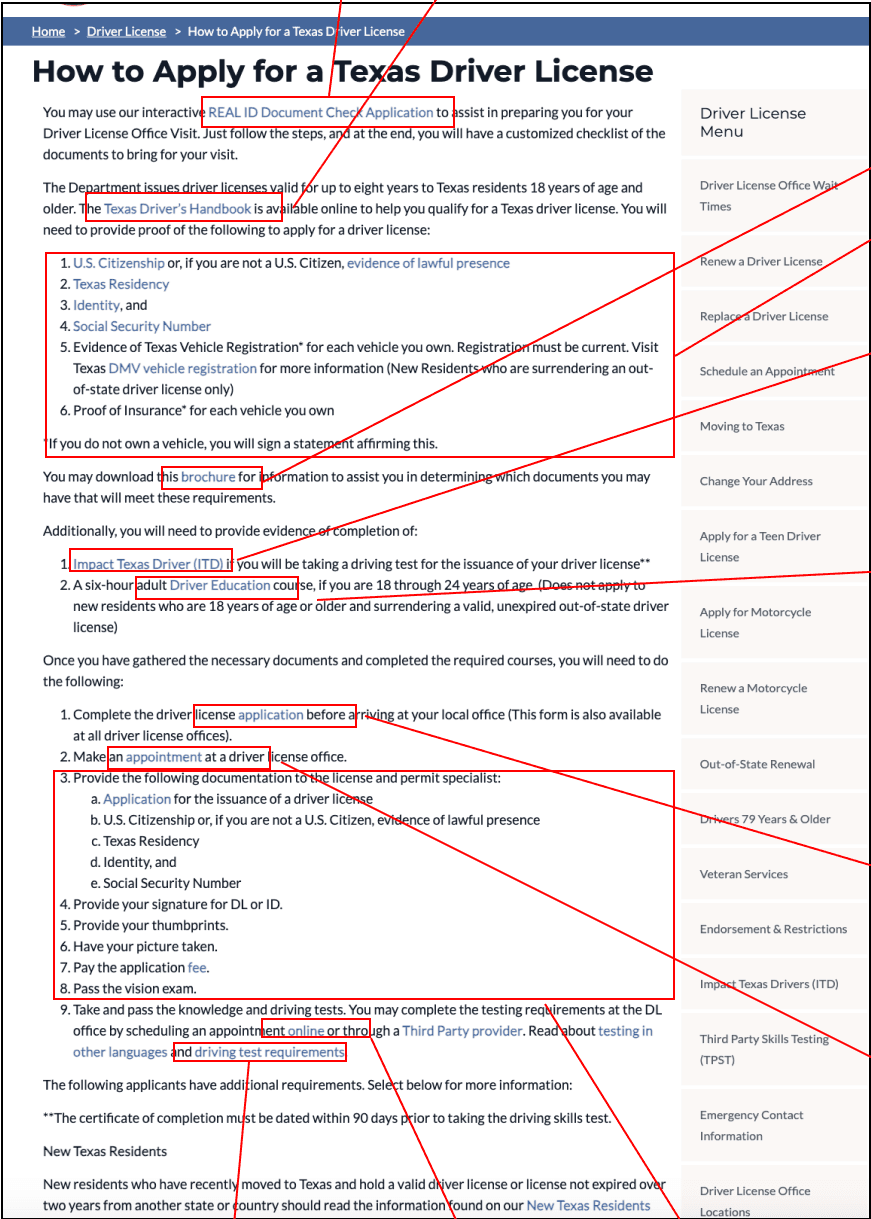
Additional help for people cannot figure what to prepare for DPS visit
Basic knowledge for driver license
What to prepare for DPS visit
Driver education required for different age group
Booking license appointment
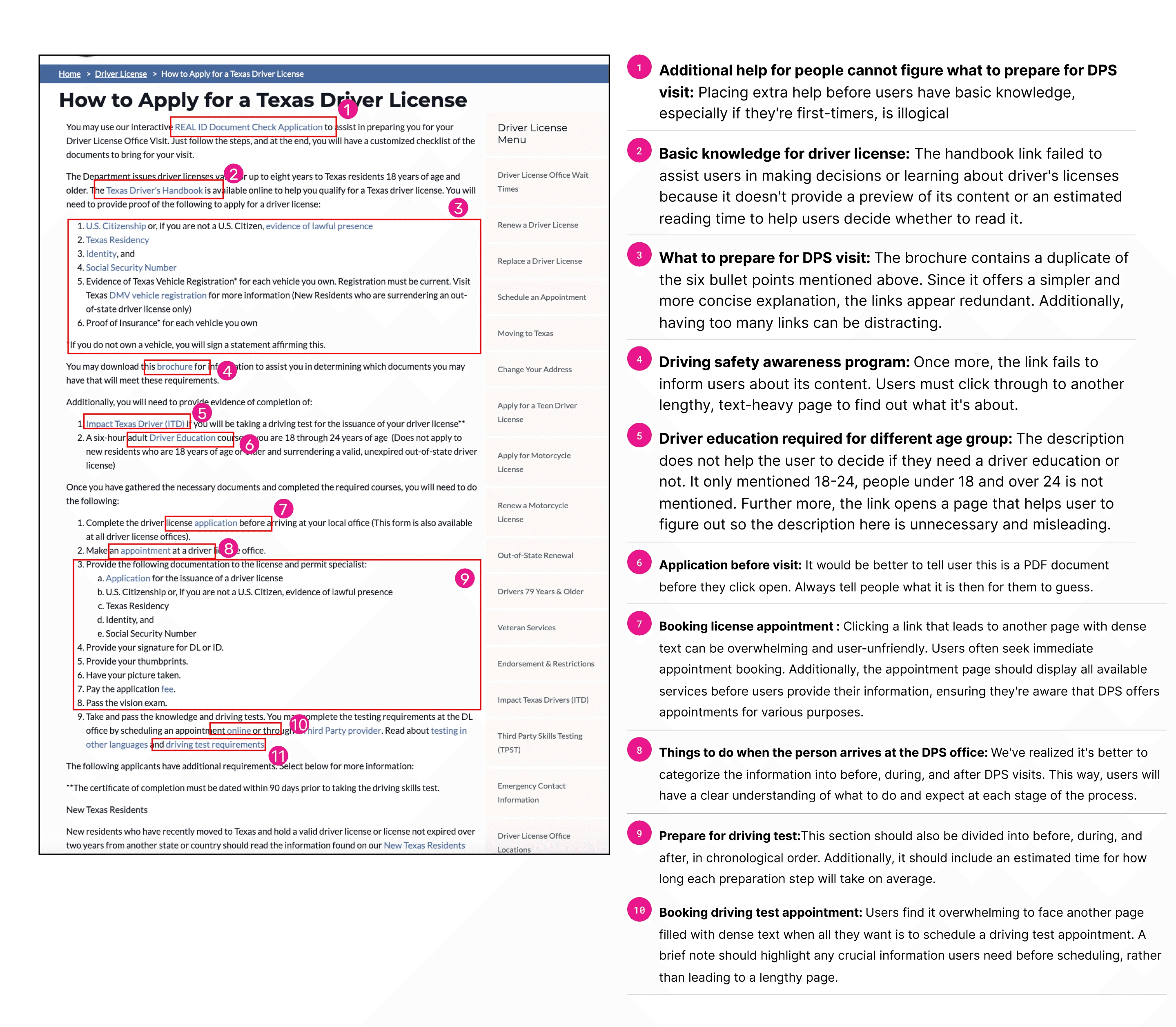
Things to do when the person arrives at the DPS office
Booking driving test appointment
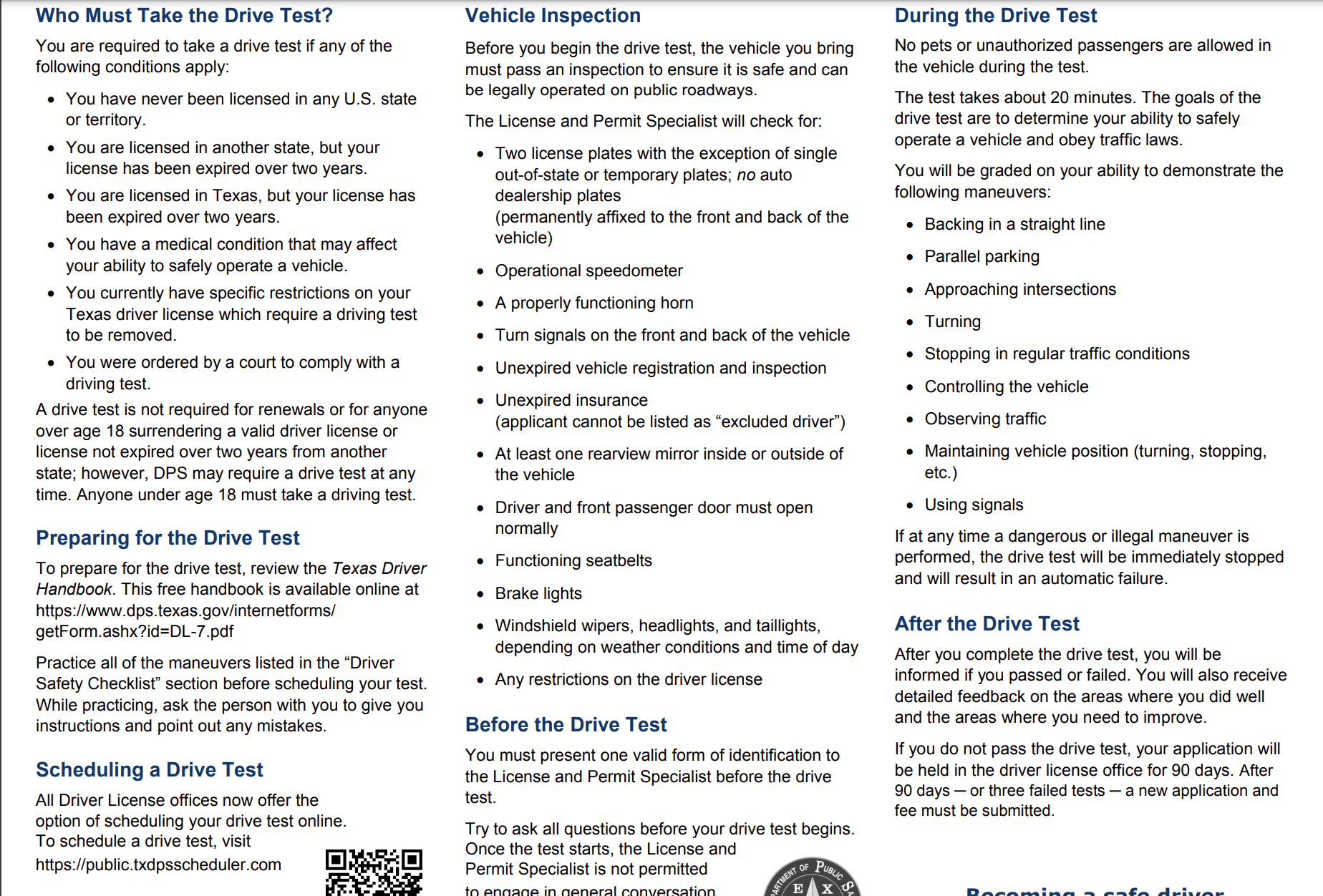
Prepare for driving test
Application before visit
Driving safety awareness program
Flow evaluation
Home page
Driver license page
How to apply page
Additional help for people cannot figure what to prepare for DPS visit
It is illogical to place the additional help before the user gets basic knowledge if they are first timer
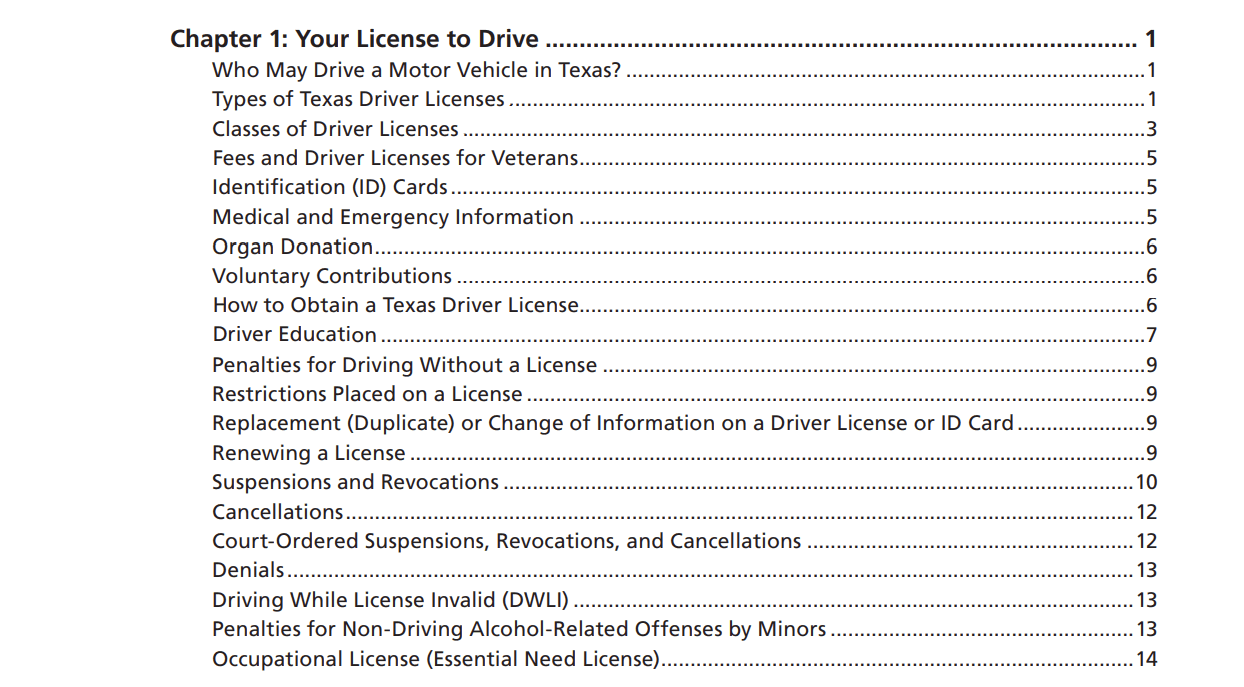
This handbook link failed to help user make decision or learn anything about driver license since it does not show what is inside the handbook or gives an estimate reading time that helps user to decide if they should read it .
What is inside the brochure is a duplicate of the 6 bullet points above. Since the brochure give as more simple and concise explanation for the bullet points, the links seems redundant. The links are also a distraction when there are too many of them.
Again the link failed to tell user what it is about. Unless the user clicks in to the page and read through another long and boring text heavy page.
The description does not help the user to decide if they need a driver education or not. It only mentioned 18-24, people under 18 and over 24 is not mentioned. Further more, the link opens a page that helps user to figure out so the description here is unnecessary and misleading.
It would be better to tell user this is a PDF document before they click open. Always tell people what it is then for them to guess.
It can be very daunting and not user friendly to click open a link which shows anther page with heavy text. User simply wants to book appointment immediately. Also the appointment page should show all the possible appointment services before user have to fill out their info so they know DPS provide appointments for different purposes
At this point we realized that it is a better idea for categorize the information consumed so far into before DPS visit, during DPS visit and after DPS visit so user has a clear idea for what to do and expect at each stage.
This part should also break down into before, during and after in a chronological order. There should be an estimate time for how long this preparation will take on average.
Again it is very daunting to see another page with very heavy text. The user simply wants to schedule the driving test appointment. If there is any important information user needs to know before scheduling appointment, then there should be a short discription to say so instead of a whole page.
Basic knowledge for driver license
What to prepare for DPS visit
Driver education required for different age group
Booking license appointment
Things to do when the person arrives at the DPS office
Booking driving test appointment
Prepare for driving test
Application before visit
Driving safety awareness program
How to Apply(before,problems)
Complete paper application
Book appointment at closest DPS center
Determine what application fee to pay
Real ID document check application
5 min to generate your personalized checklist
Check on handbook for more details
20 min reading time
Home
services
Driver License & ID Services
How to Apply for a Texas Driver License
How to Apply for a Texas Driver License
The Application Process
What happens at DPS
3
Driving Test
4
Preparation
2
Basic Knowledge
1
We provide a everything about driver license handbook where you can find topics like:
Who may driver a motor vehicle in Texas
Types of Texas driver license
Classes of driver license
Identification cards
......
Check this brochure for more info
More info on ITD
Appointment
Driver License Fees
Determine if I need driver education
Documents you need to have before DPS visit:
Before DPS visit:
Before driving test:
During driving test:
After driving test:
Additionally, you will need the completion of:
Driver education
Impact Texas Driver (ITD)
Can’t figure out for your specific situation?
Use our interactive Real ID document check application to get a customized checklist of the documents to bring to your visit:
Texas Vehicle Registration and Proof of insurance
Proof of Social Security Number
Proof of Residency in Texas
Proof of U.S. Citizenship or Lawful Presence
Proof of Identity


Take and pass knowledge and driving tests
After DPS visit :
Provide signature
Provide thumbprints
Have picture taken
Pass the vision exam
Pay application fee
During DPS visit you will:
Application PDF
Download the Driving Test Requirements
Schedule a Driving Test appointment
Third Party Skills Testing (TPST)
Book online appointment
You may complete the testing requirements at the DL office by scheduling an appointment online or through a Third Party provider.
Read through driving test requirements
No pets or unauthorized passengers are allowed in the vehicle during the test. The test takes about 20 minutes. The goals of the drive test are to determine your ability to safely operate a vehicle and obey traffic laws.
After you complete the drive test, you will be informed if you passed or failed. You will also receive detailed feedback on the areas where you did well and the areas where you need to improve. If you do not pass the drive test, your application will be held in the driver license office for 90 days. After 90 days or three failed tests a new application and fee must be submitted.

Services
DPS News
Public Safety
About DPS
Support & Contact
Forms
Law Enforcement & Crime
How to Apply(after,solution)
1
2
3
4
1
Reorganized the information into 4 big categories (Basic knowledge>preparation>What happens ar DPS> Driving test)in case user missed information they need to know beforehand
2
We break down complex steps into simpler, more digestible chunks for clarity.
3
To emphasize different hierarchies effectively, we incorporate bullet points, numbered lists, icons, and bold fonts in the text. Additionally, we replace hypertext links with buttons for essential actions and services to enhance user accessibility and interaction.
3
For what happens at DPS and Driving Test section, we use before,during and after. When the instructions are listed in chronological order, it is easier to follow.
Presentation
Benyin, JungWoo, Yizhou, Xiaobo
INF 385T Information Architecture
04/24/2024
Texas DPS website redesign

Table of Content
Introduction
Competitive analysis
IA evaluation
Usability testing
Wireframes
Prototype
Reflection
Introduction
functions of Texas DPS Website:
Texas DPS exists to protect and serve Texas by enforcing laws, administering regulatory programs, managing records, educating the public, and managing emergencies.
Driver licenses (our focus)
Handgun licenses
Vehicle inspection
Law enforcement
Emergency responses
Crime labs
...
Benyin, JungWoo, Yizhou, Xiaobo
INF 385T Information Architecture
04/24/2024
Texas DPS website redesign
Table of Content
Introduction
Competitive analysis
IA evaluation
Usability testing
Wireframes
Prototype
Reflection
Introduction
functions of Texas DPS Website:
Texas DPS exists to protect and serve Texas by enforcing laws, administering regulatory programs, managing records, educating the public, and managing emergencies.
Driver licenses (our focus)
Handgun licenses
Vehicle inspection
Law enforcement
Emergency responses
Crime labs
...
Benyin, JungWoo, Yizhou, Xiaobo
INF 385T Information Architecture
04/24/2024
Texas DPS website redesign
Table of Content
Introduction
Competitive analysis
IA evaluation
Usability testing
Wireframes
Prototype
Reflection
Introduction
functions of Texas DPS Website:
Texas DPS exists to protect and serve Texas by enforcing laws, administering regulatory programs, managing records, educating the public, and managing emergencies.
Driver licenses (our focus)
Handgun licenses
Vehicle inspection
Law enforcement
Emergency responses
Crime labs
...
Benyin, JungWoo, Yizhou, Xiaobo
INF 385T Information Architecture
04/24/2024
Texas DPS website redesign
Table of Content
Introduction
Competitive analysis
IA evaluation
Usability testing
Wireframes
Prototype
Reflection
Introduction
functions of Texas DPS Website:
Texas DPS exists to protect and serve Texas by enforcing laws, administering regulatory programs, managing records, educating the public, and managing emergencies.
Driver licenses (our focus)
Handgun licenses
Vehicle inspection
Law enforcement
Emergency responses
Crime labs
...
Competitive Analysis
11
Introduction

KoROAD
Korean Driver's License Website
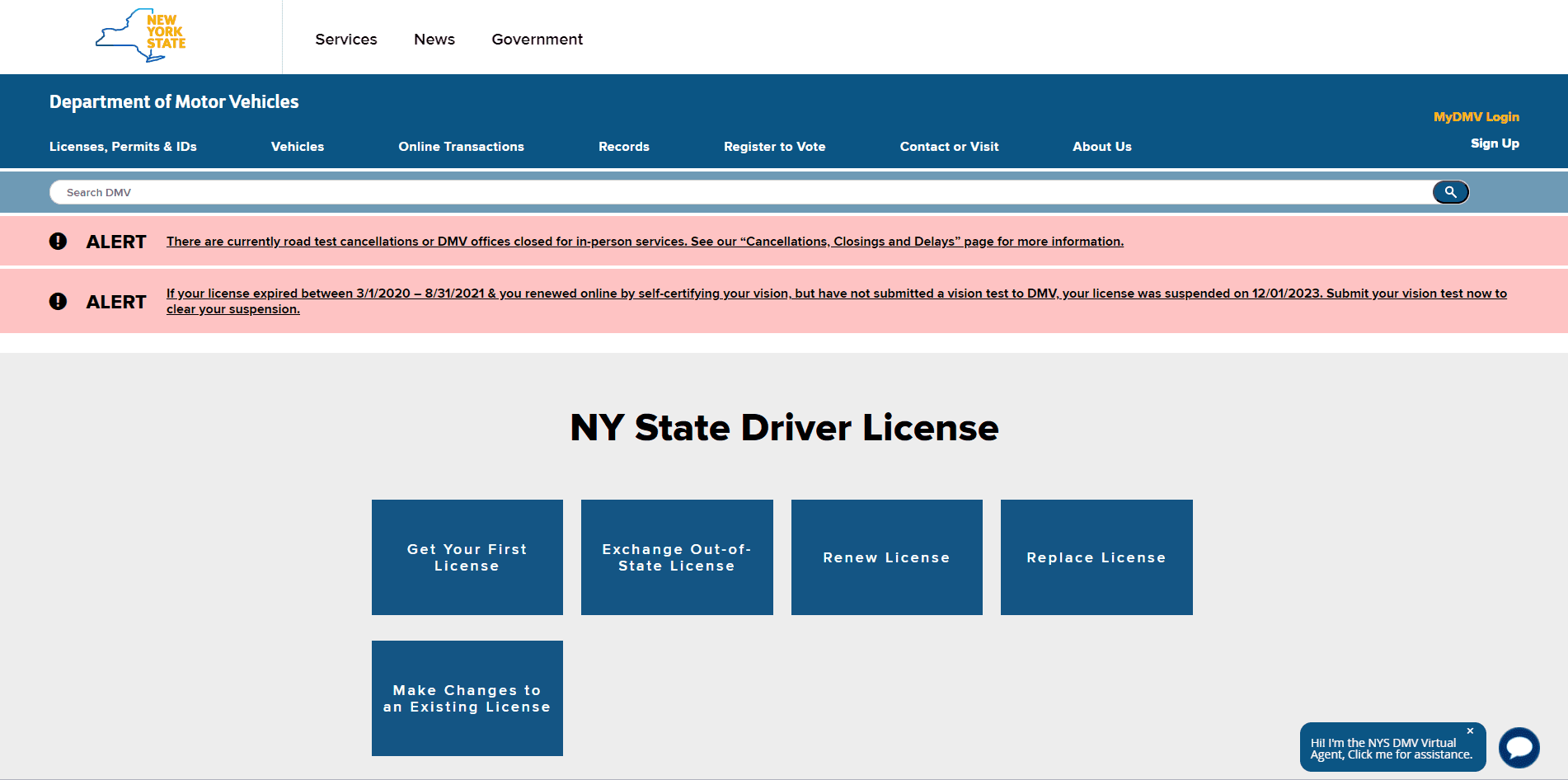
NY DMV
New York DMV Website

CA DMV
California DMV Website
11
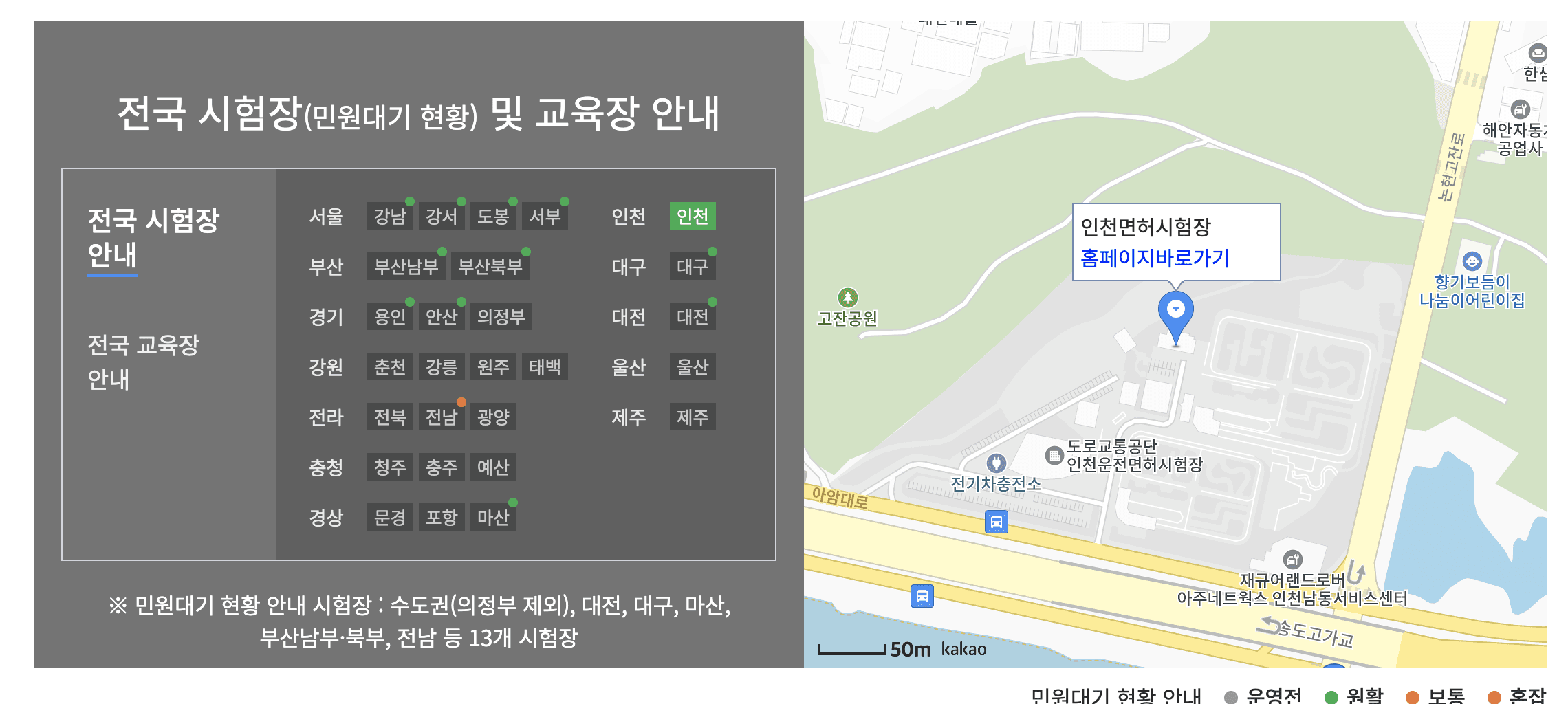

KoROAD
Map-based navigation
Interactive Map Benefits:
Streamlines navigation
Reduces wait times
Minimizes confusion
Recommendation for DSP:
Incorporate map-based navigation for easier facility access
Sequential Steps
Benefits:
a clear hierarchy of information and actions.
Guides users methodically from beginning to end of the application process.
Prevents missing critical information or tasks.
Recommendation for DSP:
Provide steps in a sequential order to ensure a uniform process.
Avoid lengthy and dense explanations, simplifying user comprehension.
11
CA.DMV & Singapore
Visual Hierarchy
Benefits of CA.DMV's Interface:
More visually appealing interface.
Clear hierarchy of information facilitates navigation.
Recommendation for DSP:
Use visual cues such as colors, icons, and contrast to highlight important elements.
Simplify complex processes to enhance user understanding and efficiency in completing the driver's license application.
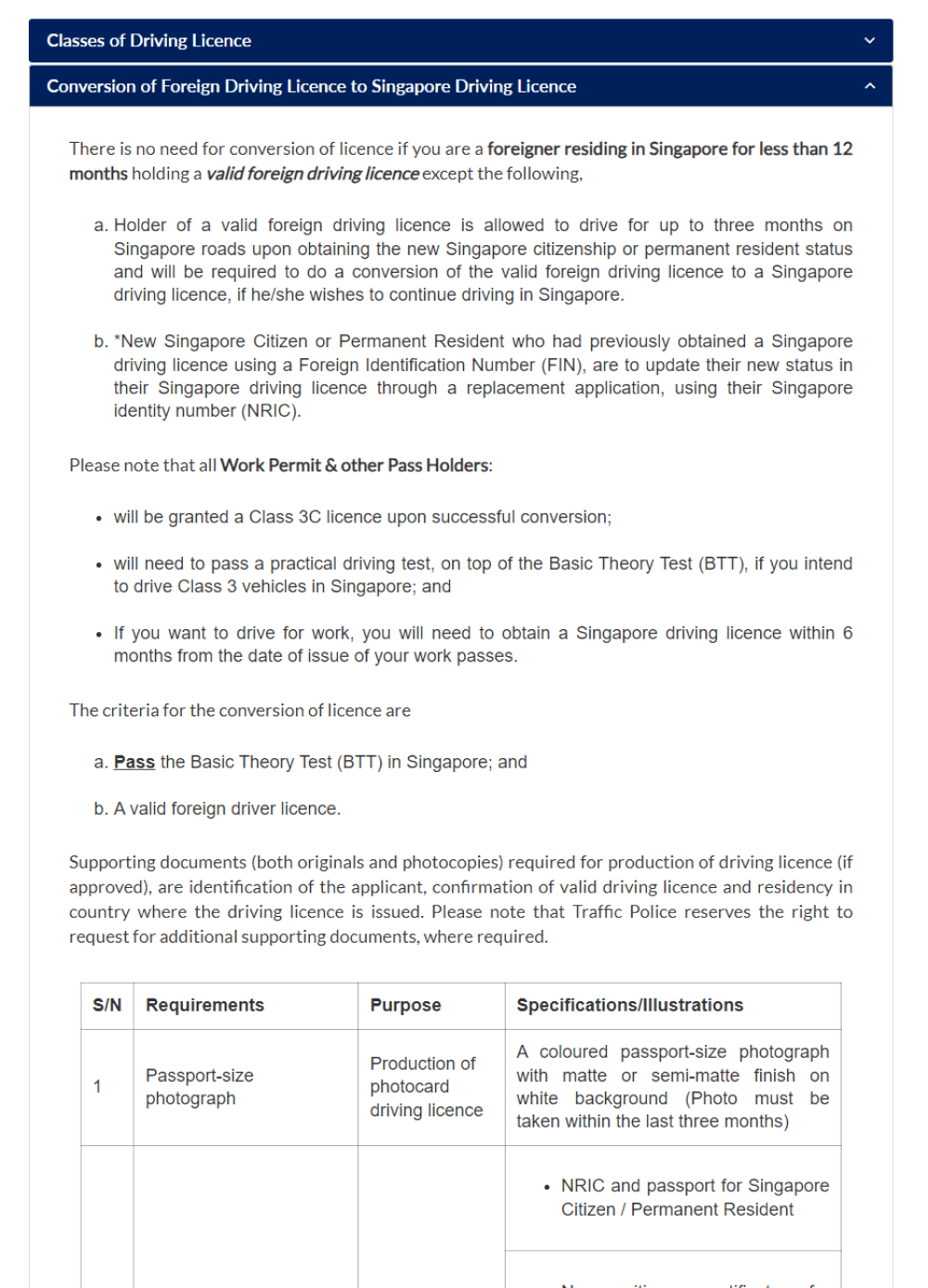
Singapore

CA.DMV
11
NY.DMV & CA.DMV
Filters
Benefits of Filter Usage on DMV Websites:
Both California DMV and New York DMV websites use filters for service types and physical locations.
Location availability filters are used, but their design is often found to be insufficient.
Recommendation for DSP:
Include more relevant filters such as service type, specific location, and availability dates.
Allow users to easily navigate through the DMV's wide range of services without being overwhelmed by irrelevant information.
Service type filter from CA.DMV


Search Function in NY.DMV
11
Introduction
KoROAD
Korean Driver's License Website
NY DMV
New York DMV Website
CA DMV
California DMV Website
11
KoROAD
Map-based navigation
Interactive Map Benefits:
Streamlines navigation
Reduces wait times
Minimizes confusion
Recommendation for DSP:
Incorporate map-based navigation for easier facility access
Sequential Steps
Benefits:
a clear hierarchy of information and actions.
Guides users methodically from beginning to end of the application process.
Prevents missing critical information or tasks.
Recommendation for DSP:
Provide steps in a sequential order to ensure a uniform process.
Avoid lengthy and dense explanations, simplifying user comprehension.
11
CA.DMV & Singapore
Visual Hierarchy
Benefits of CA.DMV's Interface:
More visually appealing interface.
Clear hierarchy of information facilitates navigation.
Recommendation for DSP:
Use visual cues such as colors, icons, and contrast to highlight important elements.
Simplify complex processes to enhance user understanding and efficiency in completing the driver's license application.
Singapore
CA.DMV
11
NY.DMV & CA.DMV
Filters
Benefits of Filter Usage on DMV Websites:
Both California DMV and New York DMV websites use filters for service types and physical locations.
Location availability filters are used, but their design is often found to be insufficient.
Recommendation for DSP:
Include more relevant filters such as service type, specific location, and availability dates.
Allow users to easily navigate through the DMV's wide range of services without being overwhelmed by irrelevant information.
Service type filter from CA.DMV
Search Function in NY.DMV
11
Introduction
KoROAD
Korean Driver's License Website
NY DMV
New York DMV Website
CA DMV
California DMV Website
11
KoROAD
Map-based navigation
Interactive Map Benefits:
Streamlines navigation
Reduces wait times
Minimizes confusion
Recommendation for DSP:
Incorporate map-based navigation for easier facility access
Sequential Steps
Benefits:
a clear hierarchy of information and actions.
Guides users methodically from beginning to end of the application process.
Prevents missing critical information or tasks.
Recommendation for DSP:
Provide steps in a sequential order to ensure a uniform process.
Avoid lengthy and dense explanations, simplifying user comprehension.
11
CA.DMV & Singapore
Visual Hierarchy
Benefits of CA.DMV's Interface:
More visually appealing interface.
Clear hierarchy of information facilitates navigation.
Recommendation for DSP:
Use visual cues such as colors, icons, and contrast to highlight important elements.
Simplify complex processes to enhance user understanding and efficiency in completing the driver's license application.
Singapore
CA.DMV
11
NY.DMV & CA.DMV
Filters
Benefits of Filter Usage on DMV Websites:
Both California DMV and New York DMV websites use filters for service types and physical locations.
Location availability filters are used, but their design is often found to be insufficient.
Recommendation for DSP:
Include more relevant filters such as service type, specific location, and availability dates.
Allow users to easily navigate through the DMV's wide range of services without being overwhelmed by irrelevant information.
Service type filter from CA.DMV
Search Function in NY.DMV
11
Introduction
KoROAD
Korean Driver's License Website
NY DMV
New York DMV Website
CA DMV
California DMV Website
11
KoROAD
Map-based navigation
Interactive Map Benefits:
Streamlines navigation
Reduces wait times
Minimizes confusion
Recommendation for DSP:
Incorporate map-based navigation for easier facility access
Sequential Steps
Benefits:
a clear hierarchy of information and actions.
Guides users methodically from beginning to end of the application process.
Prevents missing critical information or tasks.
Recommendation for DSP:
Provide steps in a sequential order to ensure a uniform process.
Avoid lengthy and dense explanations, simplifying user comprehension.
11
CA.DMV & Singapore
Visual Hierarchy
Benefits of CA.DMV's Interface:
More visually appealing interface.
Clear hierarchy of information facilitates navigation.
Recommendation for DSP:
Use visual cues such as colors, icons, and contrast to highlight important elements.
Simplify complex processes to enhance user understanding and efficiency in completing the driver's license application.
Singapore
CA.DMV
11
NY.DMV & CA.DMV
Filters
Benefits of Filter Usage on DMV Websites:
Both California DMV and New York DMV websites use filters for service types and physical locations.
Location availability filters are used, but their design is often found to be insufficient.
Recommendation for DSP:
Include more relevant filters such as service type, specific location, and availability dates.
Allow users to easily navigate through the DMV's wide range of services without being overwhelmed by irrelevant information.
Service type filter from CA.DMV
Search Function in NY.DMV
IA Evaluation
home page

1
2
3
2
3
1
Labeling & organization:
Organized into categories, but under each category, the organization schema is not clear.
Good category systems have the characteristics of being coherent and (relatively) complete and thus pose an advantage over the unpredictable results of clustering
Global Navigation
Looks like there are two global navigation
Contextual Navigation
The structure is confusing
Details under each title is misleading almost feel like a secondary title
drive license page
1
1
Contextual Navigation
Bad organized content. Without a clear and logical structure, the content is arranged in a way that doesn't make sense to the user
Inconsistent layout styles can interrupt the user's learning curve and adaptation to the website's environment
Poor scalability (users have to scroll all the way down to find what they might need)
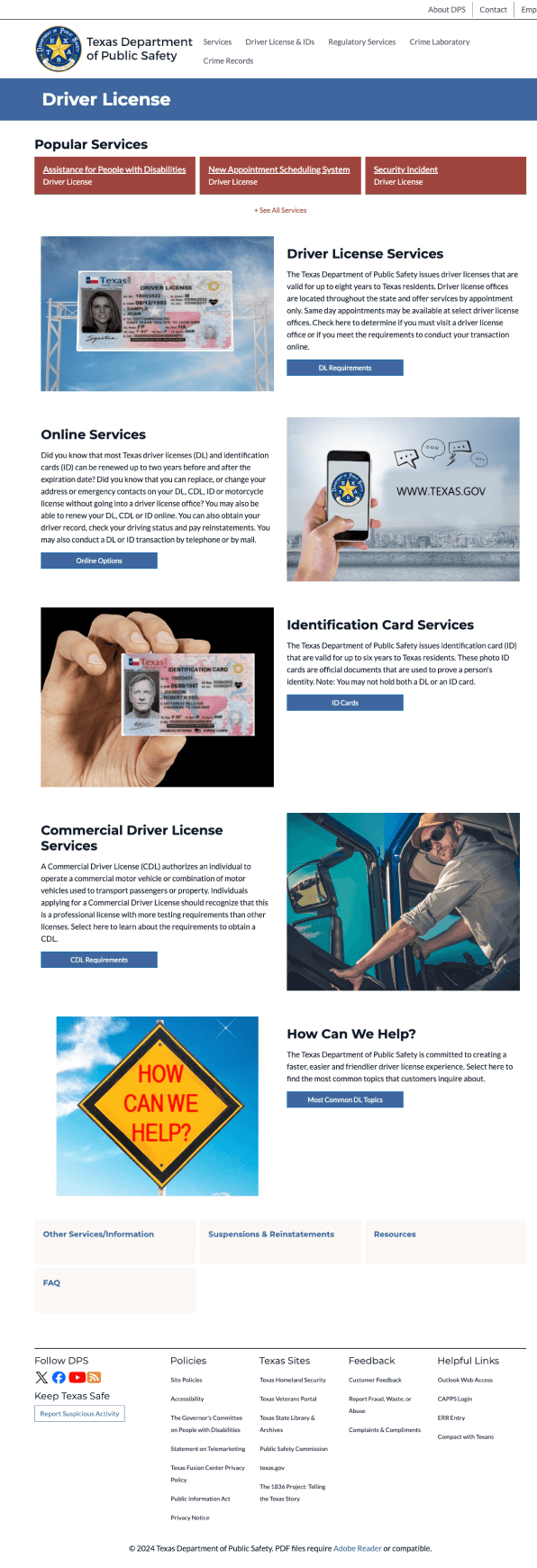
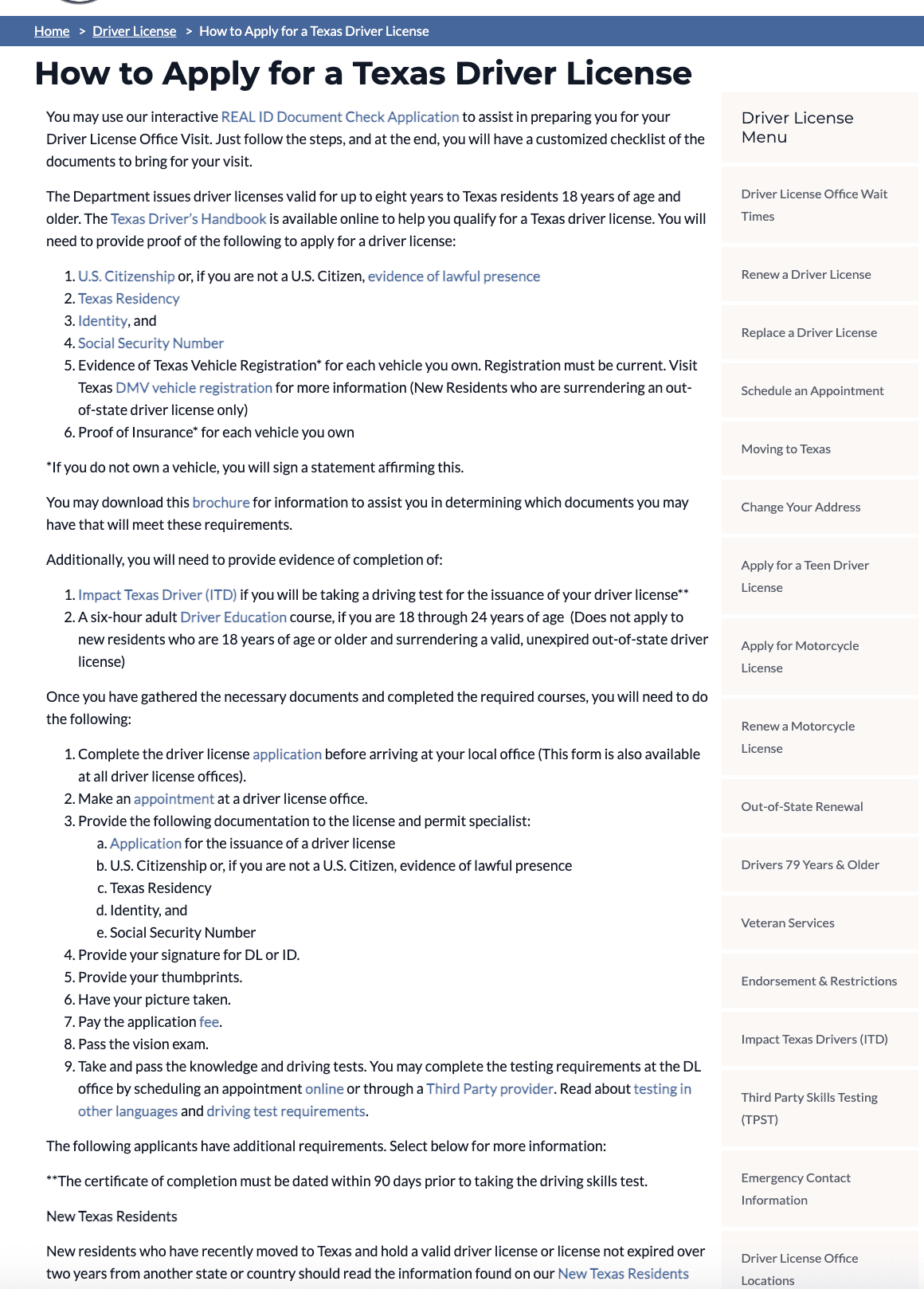
How to apply page
2
1
1
2
Organization Schema:
Chronological since we need to finish one task before the other
Linear
Hierarchy:
shallow and wide, with many contextual links that navigates to other pages
Local Navigation
Too many, and not organized, should narrow down the names.
How the information (menu) is arranged is ambiguous(not alphabetic)
Hierarchy:
No hierarchy, no rules for organization, bullet points ( same font size, no boldness )
Labeling
not consistent, some starts with noun and some starts with verbs
home page
1
2
3
2
3
1
Labeling & organization:
Organized into categories, but under each category, the organization schema is not clear.
Good category systems have the characteristics of being coherent and (relatively) complete and thus pose an advantage over the unpredictable results of clustering
Global Navigation
Looks like there are two global navigation
Contextual Navigation
The structure is confusing
Details under each title is misleading almost feel like a secondary title
drive license page
1
1
Contextual Navigation
Bad organized content. Without a clear and logical structure, the content is arranged in a way that doesn't make sense to the user
Inconsistent layout styles can interrupt the user's learning curve and adaptation to the website's environment
Poor scalability (users have to scroll all the way down to find what they might need)
How to apply page
2
1
1
2
Organization Schema:
Chronological since we need to finish one task before the other
Linear
Hierarchy:
shallow and wide, with many contextual links that navigates to other pages
Local Navigation
Too many, and not organized, should narrow down the names.
How the information (menu) is arranged is ambiguous(not alphabetic)
Hierarchy:
No hierarchy, no rules for organization, bullet points ( same font size, no boldness )
Labeling
not consistent, some starts with noun and some starts with verbs
home page
1
2
3
2
3
1
Labeling & organization:
Organized into categories, but under each category, the organization schema is not clear.
Good category systems have the characteristics of being coherent and (relatively) complete and thus pose an advantage over the unpredictable results of clustering
Global Navigation
Looks like there are two global navigation
Contextual Navigation
The structure is confusing
Details under each title is misleading almost feel like a secondary title
drive license page
1
1
Contextual Navigation
Bad organized content. Without a clear and logical structure, the content is arranged in a way that doesn't make sense to the user
Inconsistent layout styles can interrupt the user's learning curve and adaptation to the website's environment
Poor scalability (users have to scroll all the way down to find what they might need)
How to apply page
2
1
1
2
Organization Schema:
Chronological since we need to finish one task before the other
Linear
Hierarchy:
shallow and wide, with many contextual links that navigates to other pages
Local Navigation
Too many, and not organized, should narrow down the names.
How the information (menu) is arranged is ambiguous(not alphabetic)
Hierarchy:
No hierarchy, no rules for organization, bullet points ( same font size, no boldness )
Labeling
not consistent, some starts with noun and some starts with verbs
home page
1
2
3
2
3
1
Labeling & organization:
Organized into categories, but under each category, the organization schema is not clear.
Good category systems have the characteristics of being coherent and (relatively) complete and thus pose an advantage over the unpredictable results of clustering
Global Navigation
Looks like there are two global navigation
Contextual Navigation
The structure is confusing
Details under each title is misleading almost feel like a secondary title
drive license page
1
1
Contextual Navigation
Bad organized content. Without a clear and logical structure, the content is arranged in a way that doesn't make sense to the user
Inconsistent layout styles can interrupt the user's learning curve and adaptation to the website's environment
Poor scalability (users have to scroll all the way down to find what they might need)
How to apply page
2
1
1
2
Organization Schema:
Chronological since we need to finish one task before the other
Linear
Hierarchy:
shallow and wide, with many contextual links that navigates to other pages
Local Navigation
Too many, and not organized, should narrow down the names.
How the information (menu) is arranged is ambiguous(not alphabetic)
Hierarchy:
No hierarchy, no rules for organization, bullet points ( same font size, no boldness )
Labeling
not consistent, some starts with noun and some starts with verbs
Heuristic Evaluation
home page
#7: Flexibility and efficiency of use
The website does not provide shortcuts, requiring all users to navigate through several menus and dialogs to perform common actions such as documentation check and DL appointment. This could make the application process unnecessarily lengthy
#8: Aesthetic and minimalist design
The background image on the homepage is overly large, occupying excessive space.
The styles of different sections with different functions on the homepage look too similar, making it difficult to quickly find the section users need. (such as Featured News and Driver License/ID Services)
#10: Help and documentation
The website lacks a comprehensive help section for users who need guidance on the application process.
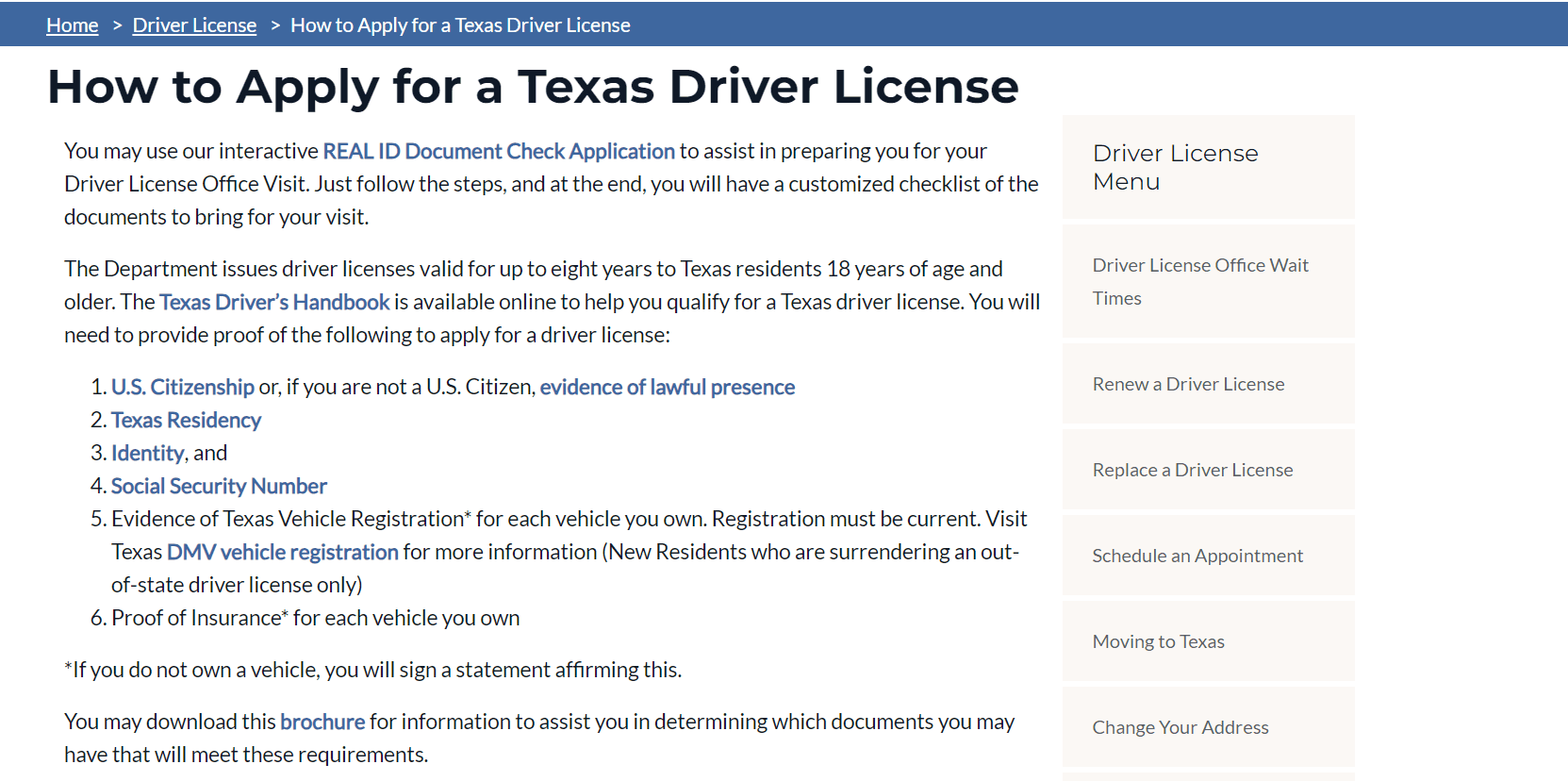
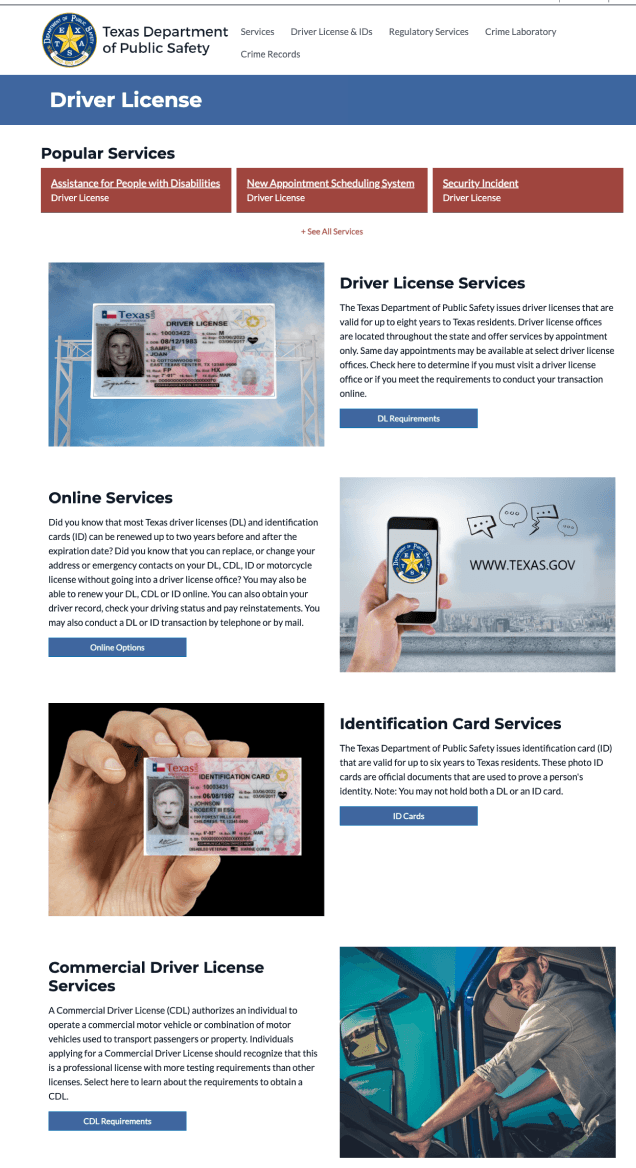
drive license page
#4: Consistency and standards
The website is inconsistent with the industry standards. Usually the button is an action word that prompt user to click on. Also, the title and button are talking about two different things, this will confuse users. Further more, when user click onto the button, the new page title is inconsistent with the button name.
#6: Recognition rather than recall
There are too many words in this page. Even though the website try to use images it is still not very helpful
#8: Aesthetic and minimalist design
The website is unclear what this the essentials in the “driver’s license” page. There are too many distraction and unnecessary elements.
How to apply page
#1: Visibility of system status
The design failed to keep user informed about where they are in the website. There are many ways to navigate to the same page. It is unclear what is the main navigation menu.
#2: Match between system and the real world
This site uses technical jargon and abbreviations in the instructions and quick links, making it difficult for users unfamiliar with the terminology. (eg. CDL, CLP, ADA accommodation)
#6: Recognition Rather than Recall
The application for a driver's license is buried within detailed descriptions, making it challenging to navigate the application process.
The instructions are overly detailed and presented solely in text. It relies heavily on users to recall information, such as the specific documents required for the application process.
#8: Aesthetic and minimalist design
This page consist of too any visual distractions. It is unclear what is the emphasis of this page.
home page
#7: Flexibility and efficiency of use
The website does not provide shortcuts, requiring all users to navigate through several menus and dialogs to perform common actions such as documentation check and DL appointment. This could make the application process unnecessarily lengthy
#8: Aesthetic and minimalist design
The background image on the homepage is overly large, occupying excessive space.
The styles of different sections with different functions on the homepage look too similar, making it difficult to quickly find the section users need. (such as Featured News and Driver License/ID Services)
#10: Help and documentation
The website lacks a comprehensive help section for users who need guidance on the application process.
drive license page
#4: Consistency and standards
The website is inconsistent with the industry standards. Usually the button is an action word that prompt user to click on. Also, the title and button are talking about two different things, this will confuse users. Further more, when user click onto the button, the new page title is inconsistent with the button name.
#6: Recognition rather than recall
There are too many words in this page. Even though the website try to use images it is still not very helpful
#8: Aesthetic and minimalist design
The website is unclear what this the essentials in the “driver’s license” page. There are too many distraction and unnecessary elements.
How to apply page
#1: Visibility of system status
The design failed to keep user informed about where they are in the website. There are many ways to navigate to the same page. It is unclear what is the main navigation menu.
#2: Match between system and the real world
This site uses technical jargon and abbreviations in the instructions and quick links, making it difficult for users unfamiliar with the terminology. (eg. CDL, CLP, ADA accommodation)
#6: Recognition Rather than Recall
The application for a driver's license is buried within detailed descriptions, making it challenging to navigate the application process.
The instructions are overly detailed and presented solely in text. It relies heavily on users to recall information, such as the specific documents required for the application process.
#8: Aesthetic and minimalist design
This page consist of too any visual distractions. It is unclear what is the emphasis of this page.
home page
#7: Flexibility and efficiency of use
The website does not provide shortcuts, requiring all users to navigate through several menus and dialogs to perform common actions such as documentation check and DL appointment. This could make the application process unnecessarily lengthy
#8: Aesthetic and minimalist design
The background image on the homepage is overly large, occupying excessive space.
The styles of different sections with different functions on the homepage look too similar, making it difficult to quickly find the section users need. (such as Featured News and Driver License/ID Services)
#10: Help and documentation
The website lacks a comprehensive help section for users who need guidance on the application process.
drive license page
#4: Consistency and standards
The website is inconsistent with the industry standards. Usually the button is an action word that prompt user to click on. Also, the title and button are talking about two different things, this will confuse users. Further more, when user click onto the button, the new page title is inconsistent with the button name.
#6: Recognition rather than recall
There are too many words in this page. Even though the website try to use images it is still not very helpful
#8: Aesthetic and minimalist design
The website is unclear what this the essentials in the “driver’s license” page. There are too many distraction and unnecessary elements.
How to apply page
#1: Visibility of system status
The design failed to keep user informed about where they are in the website. There are many ways to navigate to the same page. It is unclear what is the main navigation menu.
#2: Match between system and the real world
This site uses technical jargon and abbreviations in the instructions and quick links, making it difficult for users unfamiliar with the terminology. (eg. CDL, CLP, ADA accommodation)
#6: Recognition Rather than Recall
The application for a driver's license is buried within detailed descriptions, making it challenging to navigate the application process.
The instructions are overly detailed and presented solely in text. It relies heavily on users to recall information, such as the specific documents required for the application process.
#8: Aesthetic and minimalist design
This page consist of too any visual distractions. It is unclear what is the emphasis of this page.
home page
#7: Flexibility and efficiency of use
The website does not provide shortcuts, requiring all users to navigate through several menus and dialogs to perform common actions such as documentation check and DL appointment. This could make the application process unnecessarily lengthy
#8: Aesthetic and minimalist design
The background image on the homepage is overly large, occupying excessive space.
The styles of different sections with different functions on the homepage look too similar, making it difficult to quickly find the section users need. (such as Featured News and Driver License/ID Services)
#10: Help and documentation
The website lacks a comprehensive help section for users who need guidance on the application process.
drive license page
#4: Consistency and standards
The website is inconsistent with the industry standards. Usually the button is an action word that prompt user to click on. Also, the title and button are talking about two different things, this will confuse users. Further more, when user click onto the button, the new page title is inconsistent with the button name.
#6: Recognition rather than recall
There are too many words in this page. Even though the website try to use images it is still not very helpful
#8: Aesthetic and minimalist design
The website is unclear what this the essentials in the “driver’s license” page. There are too many distraction and unnecessary elements.
How to apply page
#1: Visibility of system status
The design failed to keep user informed about where they are in the website. There are many ways to navigate to the same page. It is unclear what is the main navigation menu.
#2: Match between system and the real world
This site uses technical jargon and abbreviations in the instructions and quick links, making it difficult for users unfamiliar with the terminology. (eg. CDL, CLP, ADA accommodation)
#6: Recognition Rather than Recall
The application for a driver's license is buried within detailed descriptions, making it challenging to navigate the application process.
The instructions are overly detailed and presented solely in text. It relies heavily on users to recall information, such as the specific documents required for the application process.
#8: Aesthetic and minimalist design
This page consist of too any visual distractions. It is unclear what is the emphasis of this page.
Usability Testing
Total 4 Moderator tests
Tasks
Task 1: Access the handbook for driver's license requirements.
Task 2: Find the application process and basic requirements
Task 3: Find the documents to prove residency
Task 4: Find the application form to fill out
Task 5: Make appointments in Texas for next week
Task 6: Find the application fees and the method to pay
Task 7: Scheduling an appointment for the driver's test.
Task 8: Find Information on License Suspensions and Reinstatements
Total 4 Moderator tests
Participant Samples
All of them should be over 25
People lacked experience in applying for a driving
license in Austin.

Total 4 Moderator tests
Preliminary Results
Task 1: Access the handbook for driver's license requirements.
The categories in the sidebar are overly subdivided. Please consider grouping similar types into single categories and including them in the submenu.
Optimize search results to display only relevant results.
Task 2: Find the application process and basic requirements
It's worth noting, though, that not everyone may realize that "DL" stands for "Driver License." To make things clearer for everyone, it would be helpful if the term "Driver License" were prominently displayed at the top, instead of just using the abbreviation "DL" in the online services section. This change would ensure that all users can easily understand and access the information they need.
Task 3: Find the documents to prove residency
Special marks, pictures, or icons are needed to indicate residency status.
Use bold font to emphasize hierarchical differences.
2
1
1
2
Total 4 Moderator tests
Preliminary Results
Task 7: Scheduling an appointment for the driver's test.
The appointment function is not included on the 'Schedule a Drive Test' page; we could consider consolidating all the relevant links onto one page.
Additionally, add a direct link for test appointments in Section 2 of the 'Schedule Road Test' page."
Task 8: Find Information on License Suspensions and Reinstatements
Why is the FAQ section positioned towards the bottom? As a user, I always prefer the quickest path to find answers. Naturally, I tend to rely on the FAQ button for solving my questions, but it's not easily found in the local navigation.
Incorporate the reinstatement process into the global navigation dropdown to ensure that users can easily find and access the reinstatement information without overlooking it.
Task 6: Find the application fees and the method to pay
I'm unsure about my class category and need to find this information. To do so, I have to download the handbook, as the classes of driver's licenses are detailed in the PDF file. It raises the question: why isn't this information directly available on the website?
Make the link to fees more obvious in How to apply for DL page. Maybe put it on the homepage since it is important information.


1
2
1
2
3
2
3
Total 4 Moderator tests
Tasks
Task 1: Access the handbook for driver's license requirements.
Task 2: Find the application process and basic requirements
Task 3: Find the documents to prove residency
Task 4: Find the application form to fill out
Task 5: Make appointments in Texas for next week
Task 6: Find the application fees and the method to pay
Task 7: Scheduling an appointment for the driver's test.
Task 8: Find Information on License Suspensions and Reinstatements
Total 4 Moderator tests
Participant Samples
All of them should be over 25
People lacked experience in applying for a driving
license in Austin.
Total 4 Moderator tests
Preliminary Results
Task 1: Access the handbook for driver's license requirements.
The categories in the sidebar are overly subdivided. Please consider grouping similar types into single categories and including them in the submenu.
Optimize search results to display only relevant results.
Task 2: Find the application process and basic requirements
It's worth noting, though, that not everyone may realize that "DL" stands for "Driver License." To make things clearer for everyone, it would be helpful if the term "Driver License" were prominently displayed at the top, instead of just using the abbreviation "DL" in the online services section. This change would ensure that all users can easily understand and access the information they need.
Task 3: Find the documents to prove residency
Special marks, pictures, or icons are needed to indicate residency status.
Use bold font to emphasize hierarchical differences.
2
1
1
2
Total 4 Moderator tests
Preliminary Results
Task 7: Scheduling an appointment for the driver's test.
The appointment function is not included on the 'Schedule a Drive Test' page; we could consider consolidating all the relevant links onto one page.
Additionally, add a direct link for test appointments in Section 2 of the 'Schedule Road Test' page."
Task 8: Find Information on License Suspensions and Reinstatements
Why is the FAQ section positioned towards the bottom? As a user, I always prefer the quickest path to find answers. Naturally, I tend to rely on the FAQ button for solving my questions, but it's not easily found in the local navigation.
Incorporate the reinstatement process into the global navigation dropdown to ensure that users can easily find and access the reinstatement information without overlooking it.
Task 6: Find the application fees and the method to pay
I'm unsure about my class category and need to find this information. To do so, I have to download the handbook, as the classes of driver's licenses are detailed in the PDF file. It raises the question: why isn't this information directly available on the website?
Make the link to fees more obvious in How to apply for DL page. Maybe put it on the homepage since it is important information.
1
2
1
2
3
2
3
Total 4 Moderator tests
Tasks
Task 1: Access the handbook for driver's license requirements.
Task 2: Find the application process and basic requirements
Task 3: Find the documents to prove residency
Task 4: Find the application form to fill out
Task 5: Make appointments in Texas for next week
Task 6: Find the application fees and the method to pay
Task 7: Scheduling an appointment for the driver's test.
Task 8: Find Information on License Suspensions and Reinstatements
Total 4 Moderator tests
Participant Samples
All of them should be over 25
People lacked experience in applying for a driving
license in Austin.
Total 4 Moderator tests
Preliminary Results
Task 1: Access the handbook for driver's license requirements.
The categories in the sidebar are overly subdivided. Please consider grouping similar types into single categories and including them in the submenu.
Optimize search results to display only relevant results.
Task 2: Find the application process and basic requirements
It's worth noting, though, that not everyone may realize that "DL" stands for "Driver License." To make things clearer for everyone, it would be helpful if the term "Driver License" were prominently displayed at the top, instead of just using the abbreviation "DL" in the online services section. This change would ensure that all users can easily understand and access the information they need.
Task 3: Find the documents to prove residency
Special marks, pictures, or icons are needed to indicate residency status.
Use bold font to emphasize hierarchical differences.
2
1
1
2
Total 4 Moderator tests
Preliminary Results
Task 7: Scheduling an appointment for the driver's test.
The appointment function is not included on the 'Schedule a Drive Test' page; we could consider consolidating all the relevant links onto one page.
Additionally, add a direct link for test appointments in Section 2 of the 'Schedule Road Test' page."
Task 8: Find Information on License Suspensions and Reinstatements
Why is the FAQ section positioned towards the bottom? As a user, I always prefer the quickest path to find answers. Naturally, I tend to rely on the FAQ button for solving my questions, but it's not easily found in the local navigation.
Incorporate the reinstatement process into the global navigation dropdown to ensure that users can easily find and access the reinstatement information without overlooking it.
Task 6: Find the application fees and the method to pay
I'm unsure about my class category and need to find this information. To do so, I have to download the handbook, as the classes of driver's licenses are detailed in the PDF file. It raises the question: why isn't this information directly available on the website?
Make the link to fees more obvious in How to apply for DL page. Maybe put it on the homepage since it is important information.
1
2
1
2
3
2
3
Total 4 Moderator tests
Tasks
Task 1: Access the handbook for driver's license requirements.
Task 2: Find the application process and basic requirements
Task 3: Find the documents to prove residency
Task 4: Find the application form to fill out
Task 5: Make appointments in Texas for next week
Task 6: Find the application fees and the method to pay
Task 7: Scheduling an appointment for the driver's test.
Task 8: Find Information on License Suspensions and Reinstatements
Total 4 Moderator tests
Participant Samples
All of them should be over 25
People lacked experience in applying for a driving
license in Austin.
Total 4 Moderator tests
Preliminary Results
Task 1: Access the handbook for driver's license requirements.
The categories in the sidebar are overly subdivided. Please consider grouping similar types into single categories and including them in the submenu.
Optimize search results to display only relevant results.
Task 2: Find the application process and basic requirements
It's worth noting, though, that not everyone may realize that "DL" stands for "Driver License." To make things clearer for everyone, it would be helpful if the term "Driver License" were prominently displayed at the top, instead of just using the abbreviation "DL" in the online services section. This change would ensure that all users can easily understand and access the information they need.
Task 3: Find the documents to prove residency
Special marks, pictures, or icons are needed to indicate residency status.
Use bold font to emphasize hierarchical differences.
2
1
1
2
Total 4 Moderator tests
Preliminary Results
Task 7: Scheduling an appointment for the driver's test.
The appointment function is not included on the 'Schedule a Drive Test' page; we could consider consolidating all the relevant links onto one page.
Additionally, add a direct link for test appointments in Section 2 of the 'Schedule Road Test' page."
Task 8: Find Information on License Suspensions and Reinstatements
Why is the FAQ section positioned towards the bottom? As a user, I always prefer the quickest path to find answers. Naturally, I tend to rely on the FAQ button for solving my questions, but it's not easily found in the local navigation.
Incorporate the reinstatement process into the global navigation dropdown to ensure that users can easily find and access the reinstatement information without overlooking it.
Task 6: Find the application fees and the method to pay
I'm unsure about my class category and need to find this information. To do so, I have to download the handbook, as the classes of driver's licenses are detailed in the PDF file. It raises the question: why isn't this information directly available on the website?
Make the link to fees more obvious in How to apply for DL page. Maybe put it on the homepage since it is important information.
1
2
1
2
3
2
3
Prototype
drive license page(Before,problem)
1
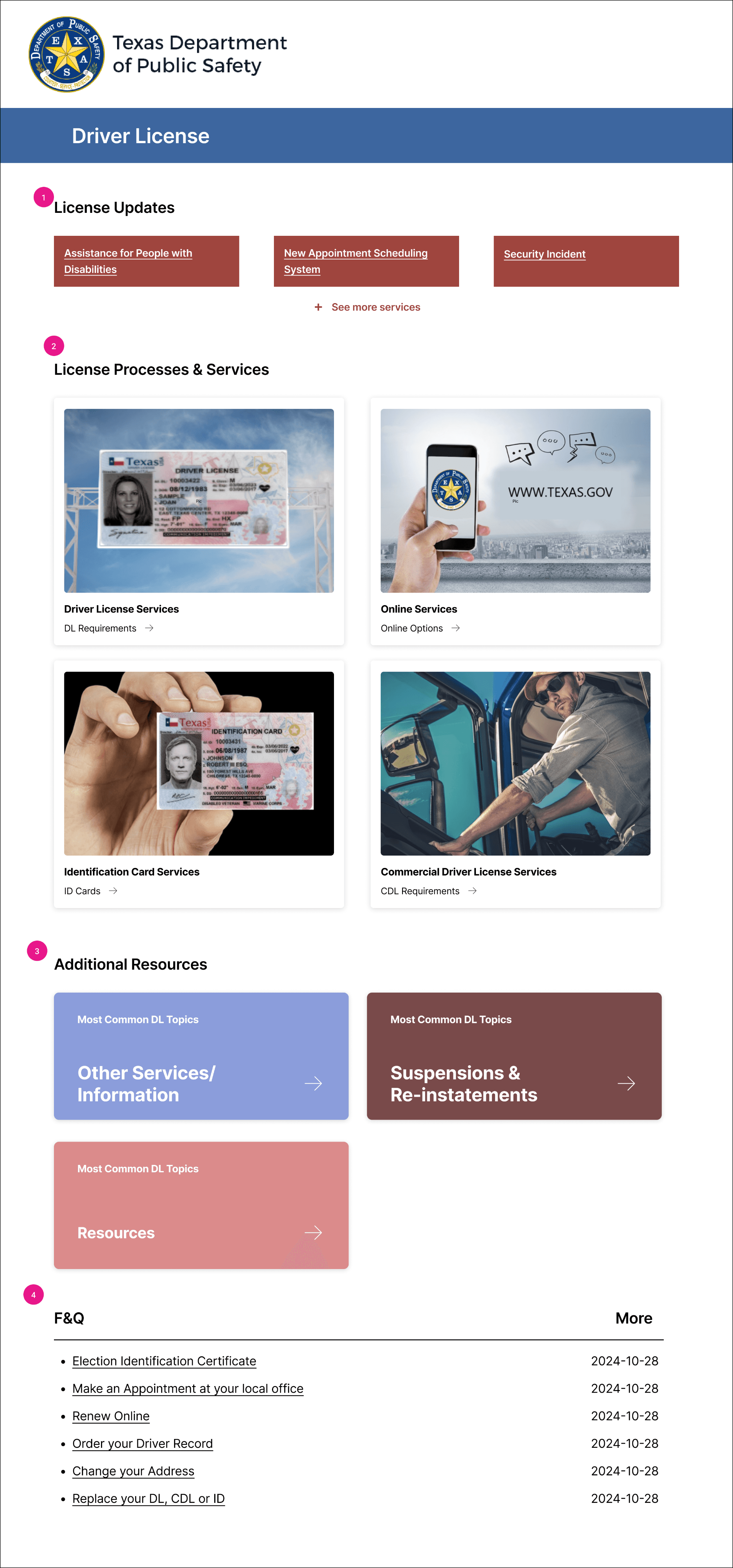
Popular Services," does not accurately reflect the subcategories listed beneath it. These categories pertain more to recent services or policies that have been made public.
2
"Driver License Services," "Online Services," "Identification Card Services," and "Commercial Driver License Services" represent generic services that are not subject to frequent changes.
3
Other Services/Information", "Suspensions & Re-instatements", and "Resources" were not clearly visible in the previous versions.
4
The FAQ section was reported as a primary resource where users seek out complex information.

1
2

3
4
drive license page(after,solution)
1
A more suitable title would be "License Updates," as it aligns more closely with the content of the subcategories.
2
"License Processes & Services" better aligns with the subcategories.
3
We have added the title "Additional Resources" to this category to enhance visibility.
4
We have established the FAQ as an independent section to ensure users can access it easily.

1
2
3
4
home page ( Before/problem )
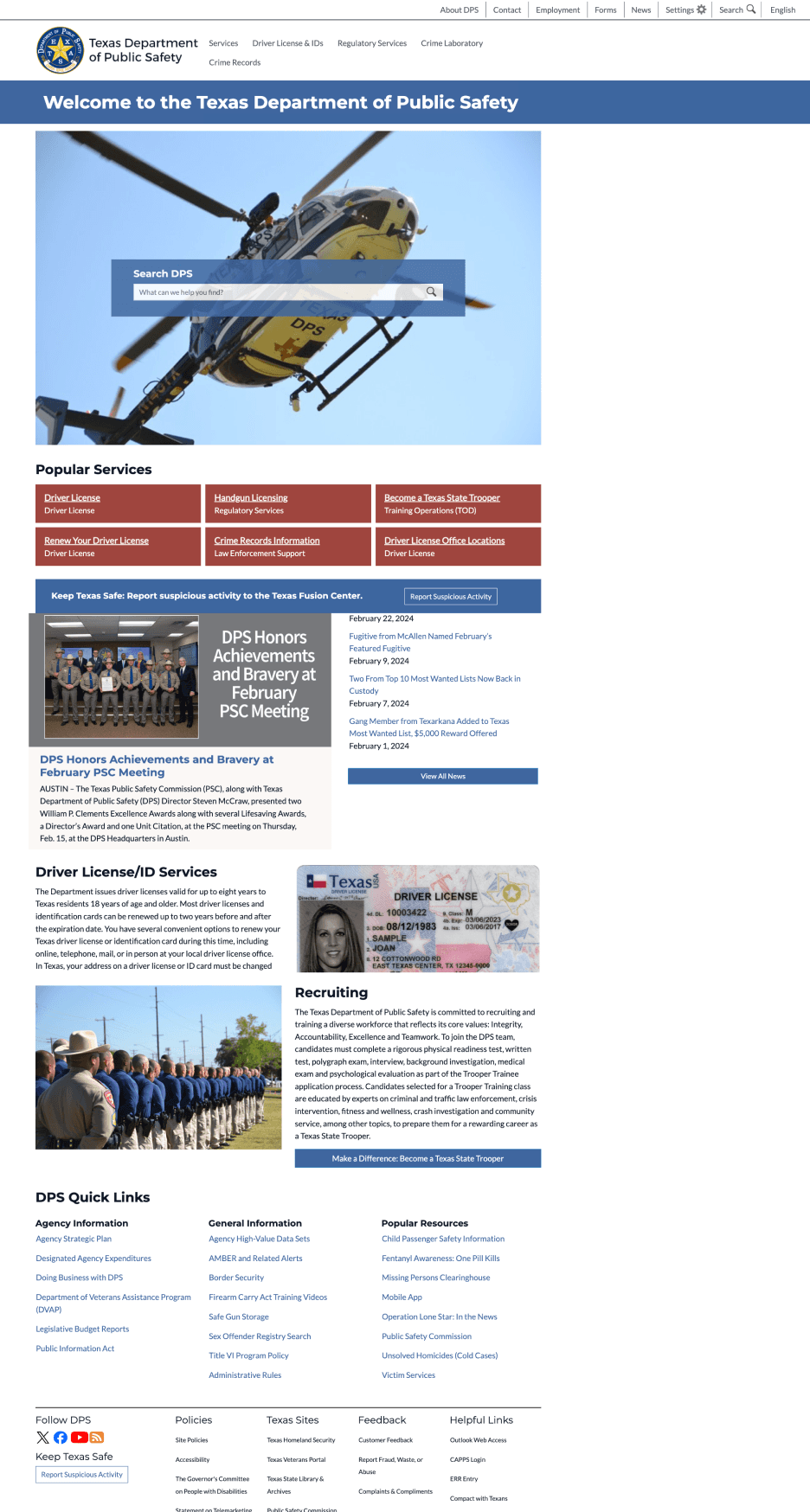
The original website uses very vague labels like “general information” and “popular resources”. All the links are cluttered, making it hard to read.
4
The news section of the origin webpage is squeezed with unnecessary information (description of services).
3
The services section of the original home page is unorganized and confusing, and the descriptions of services are unclear or unrelated.
2
The original home page has two separate global navigation bars, which can be confusing. The structure and hierarchy of two global navigation were disorganized
1
1
2
3
4

Global navigation ( after/solution )

How to apply page (before/problem )
1
2
3
4
5
1
Additional help to prepare for DPS visit: It is illogical to place the additional help before user even have any idea what this page is about when they are first timer
2
Basic knowledge for driver license: Handbook link failed to help user make decision or learn anything about driver license since it did not show what is inside the handbook or gives an estimate reading time that helps user to decide if they should read it .
3
What to prepare for DPS visit: The brochure link contains the same information as six bullet points listed above. Since it offers a simpler and more concise explanation, the bullet points appear redundant.
4
Driving safety awareness program: Again, the link is unhelpful. Is it for teens, adult or everyone? Its target audience is unclear.
5
Driver education requirement for different age groups: The description does not help the user to decide if they need a driver education or not since people under 18 and over 24 is not mentioned. Further more, the link opens a page that helps user to figure out so the description here is unnecessary and misleading.
How to apply page (before/problem )
6
7
8
9
10
6
Application PDF: This link did not label itself as PDF so user have to take guesses.
7
Book license appointment : It is very daunting to click open a link which shows another page with heavy text when you simply wants to book appointment. The appointment page should also show all the possible appointment services before user have to fill out their info so they know DPS also provide appointments for different purposes
8
Things to do when the person arrives at the DPS office: While it is in chronological order it is still a huge chunk of info. Does not give user a clear understanding of what to do and expect at each stage of the DPS visit.
9
Prepare for driving test: This section is too short and unclear. User needs to see the steps in chronological order.
10
Booking driving test appointment: This section should have a brief note to highlight any crucial information user needs before scheduling appointment, rather throwing them a link that leading to another lengthy page.
How to apply page (after/solution )
Texas Department of Public Safety
Services
Driver License & IDs
Contact & Visit
Appointment
Records
Crime Laboratory
How to Apply for a Texas Driver License
Follow the steps:
Knowledge
Preparation
What happens at DPS
Driving Test
We provide a everything about driver license handbook where you can find topics like:
Who may driver a motor vehicle in Texas
Types of Texas driver license
Classes of driver license
Identification cards
......
Check on handbook for more details
20 min reading time
1
2
3
4
Real ID document check application
5 min to generate your personalized checklist
Check this brochure for more info
Determine if I need driver education
More info on ITD
Download the Driving Test Requirements
Schedule a Driving Test appointment
Third Party Skills Testing (TPST)
Documents you need to have before DPS visit:
Additionally, you will need the completion of:
Impact Texas Driver (ITD)
Driver education
Proof of Identity
Proof of U.S. Citizenship or Lawful Presence
Proof of Residency in Texas
Proof of Social Security Number
Texas Vehicle Registration and Proof of insurance
Can’t figure out for your specific situation?
Use our interactive Real ID document check application to get a customized checklist of the documents to bring to your visit:


Before DPS visit:
Complete paper application
Book appointment at closest DPS center
Determine what application fee to pay
During DPS visit you will:
Provide signature
Provide thumbprints
Have picture taken
Pass the vision exam
Pay application fee
After DPS visit :
Take and pass knowledge and driving tests
Application
Appointment
Fee
Before driving test:
Read through driving test requirements
Book online appointment
You may complete the testing requirements at the DL office by scheduling an appointment online or through a Third Party provider.
During driving test:
No pets or unauthorized passengers are allowed in the vehicle during the test. The test takes about 20 minutes. The goals of the drive test are to determine your ability to safely operate a vehicle and obey traffic laws.
After driving test:
After you complete the drive test, you will be informed if you passed or failed. You will also receive detailed feedback on the areas where you did well and the areas where you need to improve. If you do not pass the drive test, your application will be held in the driver license office for 90 days. After 90 days or three failed tests a new application and fee must be submitted.
1
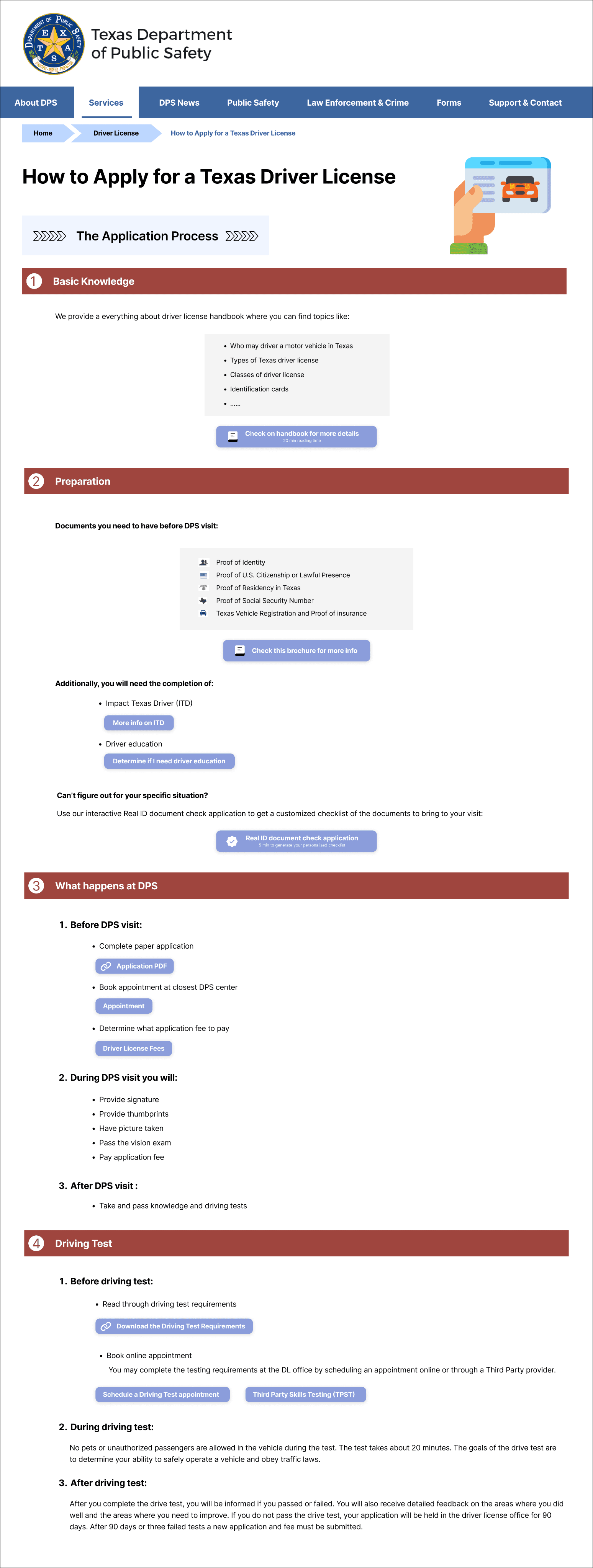
Reorganized the information into 4 big categories (Basic knowledge>preparation>What happens ar DPS> Driving test)in case user missed information they need to know beforehand
2
We break down complex steps into simpler, more digestible chunks for clarity.
3
To emphasize different hierarchies effectively, we incorporate bullet points, numbered lists, icons, and bold fonts in the text. Additionally, we replace hypertext links with buttons for essential actions and services to enhance user accessibility and interaction.
4
For what happens at DPS and Driving Test section, we use before,during and after. When the instructions are listed in chronological order, it is easier to follow.
drive license page(Before,problem)
1
Popular Services," does not accurately reflect the subcategories listed beneath it. These categories pertain more to recent services or policies that have been made public.
2
"Driver License Services," "Online Services," "Identification Card Services," and "Commercial Driver License Services" represent generic services that are not subject to frequent changes.
3
Other Services/Information", "Suspensions & Re-instatements", and "Resources" were not clearly visible in the previous versions.
4
The FAQ section was reported as a primary resource where users seek out complex information.
1
2
3
4
drive license page(after,solution)
1
A more suitable title would be "License Updates," as it aligns more closely with the content of the subcategories.
2
"License Processes & Services" better aligns with the subcategories.
3
We have added the title "Additional Resources" to this category to enhance visibility.
4
We have established the FAQ as an independent section to ensure users can access it easily.
1
2
3
4
home page ( Before/problem )
The original website uses very vague labels like “general information” and “popular resources”. All the links are cluttered, making it hard to read.
4
The news section of the origin webpage is squeezed with unnecessary information (description of services).
3
The services section of the original home page is unorganized and confusing, and the descriptions of services are unclear or unrelated.
2
The original home page has two separate global navigation bars, which can be confusing. The structure and hierarchy of two global navigation were disorganized
1
1
2
3
4
Global navigation ( after/solution )
How to apply page (before/problem )
1
2
3
4
5
1
Additional help to prepare for DPS visit: It is illogical to place the additional help before user even have any idea what this page is about when they are first timer
2
Basic knowledge for driver license: Handbook link failed to help user make decision or learn anything about driver license since it did not show what is inside the handbook or gives an estimate reading time that helps user to decide if they should read it .
3
What to prepare for DPS visit: The brochure link contains the same information as six bullet points listed above. Since it offers a simpler and more concise explanation, the bullet points appear redundant.
4
Driving safety awareness program: Again, the link is unhelpful. Is it for teens, adult or everyone? Its target audience is unclear.
5
Driver education requirement for different age groups: The description does not help the user to decide if they need a driver education or not since people under 18 and over 24 is not mentioned. Further more, the link opens a page that helps user to figure out so the description here is unnecessary and misleading.
How to apply page (before/problem )
6
7
8
9
10
6
Application PDF: This link did not label itself as PDF so user have to take guesses.
7
Book license appointment : It is very daunting to click open a link which shows another page with heavy text when you simply wants to book appointment. The appointment page should also show all the possible appointment services before user have to fill out their info so they know DPS also provide appointments for different purposes
8
Things to do when the person arrives at the DPS office: While it is in chronological order it is still a huge chunk of info. Does not give user a clear understanding of what to do and expect at each stage of the DPS visit.
9
Prepare for driving test: This section is too short and unclear. User needs to see the steps in chronological order.
10
Booking driving test appointment: This section should have a brief note to highlight any crucial information user needs before scheduling appointment, rather throwing them a link that leading to another lengthy page.
How to apply page (after/solution )
Texas Department of Public Safety
Services
Driver License & IDs
Contact & Visit
Appointment
Records
Crime Laboratory
How to Apply for a Texas Driver License
Follow the steps:
Knowledge
Preparation
What happens at DPS
Driving Test
We provide a everything about driver license handbook where you can find topics like:
Who may driver a motor vehicle in Texas
Types of Texas driver license
Classes of driver license
Identification cards
......
Check on handbook for more details
20 min reading time
1
2
3
4
Real ID document check application
5 min to generate your personalized checklist
Check this brochure for more info
Determine if I need driver education
More info on ITD
Download the Driving Test Requirements
Schedule a Driving Test appointment
Third Party Skills Testing (TPST)
Documents you need to have before DPS visit:
Additionally, you will need the completion of:
Impact Texas Driver (ITD)
Driver education
Proof of Identity
Proof of U.S. Citizenship or Lawful Presence
Proof of Residency in Texas
Proof of Social Security Number
Texas Vehicle Registration and Proof of insurance
Can’t figure out for your specific situation?
Use our interactive Real ID document check application to get a customized checklist of the documents to bring to your visit:
Before DPS visit:
Complete paper application
Book appointment at closest DPS center
Determine what application fee to pay
During DPS visit you will:
Provide signature
Provide thumbprints
Have picture taken
Pass the vision exam
Pay application fee
After DPS visit :
Take and pass knowledge and driving tests
Application
Appointment
Fee
Before driving test:
Read through driving test requirements
Book online appointment
You may complete the testing requirements at the DL office by scheduling an appointment online or through a Third Party provider.
During driving test:
No pets or unauthorized passengers are allowed in the vehicle during the test. The test takes about 20 minutes. The goals of the drive test are to determine your ability to safely operate a vehicle and obey traffic laws.
After driving test:
After you complete the drive test, you will be informed if you passed or failed. You will also receive detailed feedback on the areas where you did well and the areas where you need to improve. If you do not pass the drive test, your application will be held in the driver license office for 90 days. After 90 days or three failed tests a new application and fee must be submitted.
1
Reorganized the information into 4 big categories (Basic knowledge>preparation>What happens ar DPS> Driving test)in case user missed information they need to know beforehand
2
We break down complex steps into simpler, more digestible chunks for clarity.
3
To emphasize different hierarchies effectively, we incorporate bullet points, numbered lists, icons, and bold fonts in the text. Additionally, we replace hypertext links with buttons for essential actions and services to enhance user accessibility and interaction.
4
For what happens at DPS and Driving Test section, we use before,during and after. When the instructions are listed in chronological order, it is easier to follow.
drive license page(Before,problem)
1
Popular Services," does not accurately reflect the subcategories listed beneath it. These categories pertain more to recent services or policies that have been made public.
2
"Driver License Services," "Online Services," "Identification Card Services," and "Commercial Driver License Services" represent generic services that are not subject to frequent changes.
3
Other Services/Information", "Suspensions & Re-instatements", and "Resources" were not clearly visible in the previous versions.
4
The FAQ section was reported as a primary resource where users seek out complex information.
1
2
3
4
drive license page(after,solution)
1
A more suitable title would be "License Updates," as it aligns more closely with the content of the subcategories.
2
"License Processes & Services" better aligns with the subcategories.
3
We have added the title "Additional Resources" to this category to enhance visibility.
4
We have established the FAQ as an independent section to ensure users can access it easily.
1
2
3
4
home page ( Before/problem )
The original website uses very vague labels like “general information” and “popular resources”. All the links are cluttered, making it hard to read.
4
The news section of the origin webpage is squeezed with unnecessary information (description of services).
3
The services section of the original home page is unorganized and confusing, and the descriptions of services are unclear or unrelated.
2
The original home page has two separate global navigation bars, which can be confusing. The structure and hierarchy of two global navigation were disorganized
1
1
2
3
4
Global navigation ( after/solution )
How to apply page (before/problem )
1
2
3
4
5
1
Additional help to prepare for DPS visit: It is illogical to place the additional help before user even have any idea what this page is about when they are first timer
2
Basic knowledge for driver license: Handbook link failed to help user make decision or learn anything about driver license since it did not show what is inside the handbook or gives an estimate reading time that helps user to decide if they should read it .
3
What to prepare for DPS visit: The brochure link contains the same information as six bullet points listed above. Since it offers a simpler and more concise explanation, the bullet points appear redundant.
4
Driving safety awareness program: Again, the link is unhelpful. Is it for teens, adult or everyone? Its target audience is unclear.
5
Driver education requirement for different age groups: The description does not help the user to decide if they need a driver education or not since people under 18 and over 24 is not mentioned. Further more, the link opens a page that helps user to figure out so the description here is unnecessary and misleading.
How to apply page (before/problem )
6
7
8
9
10
6
Application PDF: This link did not label itself as PDF so user have to take guesses.
7
Book license appointment : It is very daunting to click open a link which shows another page with heavy text when you simply wants to book appointment. The appointment page should also show all the possible appointment services before user have to fill out their info so they know DPS also provide appointments for different purposes
8
Things to do when the person arrives at the DPS office: While it is in chronological order it is still a huge chunk of info. Does not give user a clear understanding of what to do and expect at each stage of the DPS visit.
9
Prepare for driving test: This section is too short and unclear. User needs to see the steps in chronological order.
10
Booking driving test appointment: This section should have a brief note to highlight any crucial information user needs before scheduling appointment, rather throwing them a link that leading to another lengthy page.
How to apply page (after/solution )
Texas Department of Public Safety
Services
Driver License & IDs
Contact & Visit
Appointment
Records
Crime Laboratory
How to Apply for a Texas Driver License
Follow the steps:
Knowledge
Preparation
What happens at DPS
Driving Test
We provide a everything about driver license handbook where you can find topics like:
Who may driver a motor vehicle in Texas
Types of Texas driver license
Classes of driver license
Identification cards
......
Check on handbook for more details
20 min reading time
1
2
3
4
Real ID document check application
5 min to generate your personalized checklist
Check this brochure for more info
Determine if I need driver education
More info on ITD
Download the Driving Test Requirements
Schedule a Driving Test appointment
Third Party Skills Testing (TPST)
Documents you need to have before DPS visit:
Additionally, you will need the completion of:
Impact Texas Driver (ITD)
Driver education
Proof of Identity
Proof of U.S. Citizenship or Lawful Presence
Proof of Residency in Texas
Proof of Social Security Number
Texas Vehicle Registration and Proof of insurance
Can’t figure out for your specific situation?
Use our interactive Real ID document check application to get a customized checklist of the documents to bring to your visit:
Before DPS visit:
Complete paper application
Book appointment at closest DPS center
Determine what application fee to pay
During DPS visit you will:
Provide signature
Provide thumbprints
Have picture taken
Pass the vision exam
Pay application fee
After DPS visit :
Take and pass knowledge and driving tests
Application
Appointment
Fee
Before driving test:
Read through driving test requirements
Book online appointment
You may complete the testing requirements at the DL office by scheduling an appointment online or through a Third Party provider.
During driving test:
No pets or unauthorized passengers are allowed in the vehicle during the test. The test takes about 20 minutes. The goals of the drive test are to determine your ability to safely operate a vehicle and obey traffic laws.
After driving test:
After you complete the drive test, you will be informed if you passed or failed. You will also receive detailed feedback on the areas where you did well and the areas where you need to improve. If you do not pass the drive test, your application will be held in the driver license office for 90 days. After 90 days or three failed tests a new application and fee must be submitted.
1
Reorganized the information into 4 big categories (Basic knowledge>preparation>What happens ar DPS> Driving test)in case user missed information they need to know beforehand
2
We break down complex steps into simpler, more digestible chunks for clarity.
3
To emphasize different hierarchies effectively, we incorporate bullet points, numbered lists, icons, and bold fonts in the text. Additionally, we replace hypertext links with buttons for essential actions and services to enhance user accessibility and interaction.
4
For what happens at DPS and Driving Test section, we use before,during and after. When the instructions are listed in chronological order, it is easier to follow.
drive license page(Before,problem)
1
Popular Services," does not accurately reflect the subcategories listed beneath it. These categories pertain more to recent services or policies that have been made public.
2
"Driver License Services," "Online Services," "Identification Card Services," and "Commercial Driver License Services" represent generic services that are not subject to frequent changes.
3
Other Services/Information", "Suspensions & Re-instatements", and "Resources" were not clearly visible in the previous versions.
4
The FAQ section was reported as a primary resource where users seek out complex information.
1
2
3
4
drive license page(after,solution)
1
A more suitable title would be "License Updates," as it aligns more closely with the content of the subcategories.
2
"License Processes & Services" better aligns with the subcategories.
3
We have added the title "Additional Resources" to this category to enhance visibility.
4
We have established the FAQ as an independent section to ensure users can access it easily.
1
2
3
4
home page ( Before/problem )
The original website uses very vague labels like “general information” and “popular resources”. All the links are cluttered, making it hard to read.
4
The news section of the origin webpage is squeezed with unnecessary information (description of services).
3
The services section of the original home page is unorganized and confusing, and the descriptions of services are unclear or unrelated.
2
The original home page has two separate global navigation bars, which can be confusing. The structure and hierarchy of two global navigation were disorganized
1
1
2
3
4
Global navigation ( after/solution )
How to apply page (before/problem )
1
2
3
4
5
1
Additional help to prepare for DPS visit: It is illogical to place the additional help before user even have any idea what this page is about when they are first timer
2
Basic knowledge for driver license: Handbook link failed to help user make decision or learn anything about driver license since it did not show what is inside the handbook or gives an estimate reading time that helps user to decide if they should read it .
3
What to prepare for DPS visit: The brochure link contains the same information as six bullet points listed above. Since it offers a simpler and more concise explanation, the bullet points appear redundant.
4
Driving safety awareness program: Again, the link is unhelpful. Is it for teens, adult or everyone? Its target audience is unclear.
5
Driver education requirement for different age groups: The description does not help the user to decide if they need a driver education or not since people under 18 and over 24 is not mentioned. Further more, the link opens a page that helps user to figure out so the description here is unnecessary and misleading.
How to apply page (before/problem )
6
7
8
9
10
6
Application PDF: This link did not label itself as PDF so user have to take guesses.
7
Book license appointment : It is very daunting to click open a link which shows another page with heavy text when you simply wants to book appointment. The appointment page should also show all the possible appointment services before user have to fill out their info so they know DPS also provide appointments for different purposes
8
Things to do when the person arrives at the DPS office: While it is in chronological order it is still a huge chunk of info. Does not give user a clear understanding of what to do and expect at each stage of the DPS visit.
9
Prepare for driving test: This section is too short and unclear. User needs to see the steps in chronological order.
10
Booking driving test appointment: This section should have a brief note to highlight any crucial information user needs before scheduling appointment, rather throwing them a link that leading to another lengthy page.
How to apply page (after/solution )
Texas Department of Public Safety
Services
Driver License & IDs
Contact & Visit
Appointment
Records
Crime Laboratory
How to Apply for a Texas Driver License
Follow the steps:
Knowledge
Preparation
What happens at DPS
Driving Test
We provide a everything about driver license handbook where you can find topics like:
Who may driver a motor vehicle in Texas
Types of Texas driver license
Classes of driver license
Identification cards
......
Check on handbook for more details
20 min reading time
1
2
3
4
Real ID document check application
5 min to generate your personalized checklist
Check this brochure for more info
Determine if I need driver education
More info on ITD
Download the Driving Test Requirements
Schedule a Driving Test appointment
Third Party Skills Testing (TPST)
Documents you need to have before DPS visit:
Additionally, you will need the completion of:
Impact Texas Driver (ITD)
Driver education
Proof of Identity
Proof of U.S. Citizenship or Lawful Presence
Proof of Residency in Texas
Proof of Social Security Number
Texas Vehicle Registration and Proof of insurance
Can’t figure out for your specific situation?
Use our interactive Real ID document check application to get a customized checklist of the documents to bring to your visit:
Before DPS visit:
Complete paper application
Book appointment at closest DPS center
Determine what application fee to pay
During DPS visit you will:
Provide signature
Provide thumbprints
Have picture taken
Pass the vision exam
Pay application fee
After DPS visit :
Take and pass knowledge and driving tests
Application
Appointment
Fee
Before driving test:
Read through driving test requirements
Book online appointment
You may complete the testing requirements at the DL office by scheduling an appointment online or through a Third Party provider.
During driving test:
No pets or unauthorized passengers are allowed in the vehicle during the test. The test takes about 20 minutes. The goals of the drive test are to determine your ability to safely operate a vehicle and obey traffic laws.
After driving test:
After you complete the drive test, you will be informed if you passed or failed. You will also receive detailed feedback on the areas where you did well and the areas where you need to improve. If you do not pass the drive test, your application will be held in the driver license office for 90 days. After 90 days or three failed tests a new application and fee must be submitted.
1
Reorganized the information into 4 big categories (Basic knowledge>preparation>What happens ar DPS> Driving test)in case user missed information they need to know beforehand
2
We break down complex steps into simpler, more digestible chunks for clarity.
3
To emphasize different hierarchies effectively, we incorporate bullet points, numbered lists, icons, and bold fonts in the text. Additionally, we replace hypertext links with buttons for essential actions and services to enhance user accessibility and interaction.
4
For what happens at DPS and Driving Test section, we use before,during and after. When the instructions are listed in chronological order, it is easier to follow.
© 2026 by Benyin (❁´◡`❁)